


First of all: I use translation software, just in case the translation into English isn't perfect blame someone else please.
The hardest part of creating a character is getting a data set. I think I've found a pretty simple way to solve that using prompted embeddings. I know you can train embeddings, but it's like with my food: I like to know what it's made of.
This article describes how to create the embeddings and how to quickly create prompts for a charakter LoRA dataset.
It´s made for ForgeUI
For creating the embeddings I used ForgeUI with the embedding merge extension. The embedding merge extension is largely self-explanatory; therefore, I will only describe the prompts I use.
I will explain the workflow using the example of embeddings for a character I have named "Frauke".
The Frauke-files are available here
And there are Anna-files too...
and finally the Zoe-files and the Zoe-LoRA with the training data
You need to create three embeddings with the embedding merge extension:
Description of Frauke_face
Description of the Frauke_body
Merging of Frauke_face and Frauke_body into Frauke
I've been trying for a long time to combine these three embeddings into a single one. For several reasons, this seems impossible with prompted embeddings. The two most important reasons are:
1. The number of tokens in the embeddings is limited, which isn't enough to describe a person precisely enough.
2. Balancing the weighting of body and face in a single embedding is incredibly difficult, making precise control of the prompts during image generation tedious.
1st Embedding, Description of the face, embedding name: frauke_gesicht
It seems there are some restrictions on the use of embedding names in the third prompt. After some trial and error, I decided on the syntax 'charactername_Face'. 'frauke_face' does not work for some reasons, but the German translation 'frauke_gesicht' did. 'anna_face' didn't work with a second character either, but 'anna_gesicht' did.
the prompt:
<'person_1'*0.6+'person_2'*0.4+'korean_idol'*0.3+'european_model'*0.3>*1.0 <{'person_1'*0.7+'person_2'*0.5}*0.8> <{'korean_idol'*0.6+'european_model'*0.5}*0.7> 'sharp jawline','almond eyes','high cheekbones','full lips','symmetrical face','soft skin texture','detailed iris','black hair'
Person_1 and Person_2 are the references. Experiment to see who your checkpoint recognizes. The embedding process blends both persons into a new person, combining the features of Person_1 and Person_2 according to their weightings ('person'*NUM) and overlays it with suitable general descriptions, in this case 'korean Idol' and 'european model'
A few concrete descriptions of facial features effectively ensure that Frauke doesn't end up looking like just a mix of Person_1 and Person_2.
If prompt generation isn't working, either a character has been missing somewhere (for me, usually an ' or <>) or there's an extra space outside of the 'tags'. Sometimes, however, it's a few tokens too many. In that case, it's best to leave out a few specific descriptions.
2nd Embedding, Description of the body, embedding name: frauke_koerper:
Here too, the embedding name is important. 'frauke_body' doesn't work for prompt No. 3, so again the German translation 'frauke_koerper' is used.
the prompt:
<'graceful_figure'*0.7+'ballet_dancer'*0.5+'fashion_model'*0.6>*1.0 <{'graceful_figure'*0.8+'ballet_dancer'*0.6}*0.9>
<{'fashion_model'*0.7+'athletic_build'*0.4}*0.8>
'balanced proportions','slim waistline','natural posture','shoulder-to-hip ratio'...and whatever else you may like
3rd Embedding, bring it together, embedding name: frauke1
the prompt:
<{'frauke_gesicht'*1.0+'frauke_koerper'*1.0}*0.9>
<{'frauke_gesicht'*0.8+'frauke_koerper'*0.8}*0.1>
<'frauke_gesicht'*1.1>
<'frauke_koerper'*1.0>
'highly detailed face','graceful proportions','elegant silhouette','natural posture'
Now you basically have everything you need for the character. Here's Frauke:
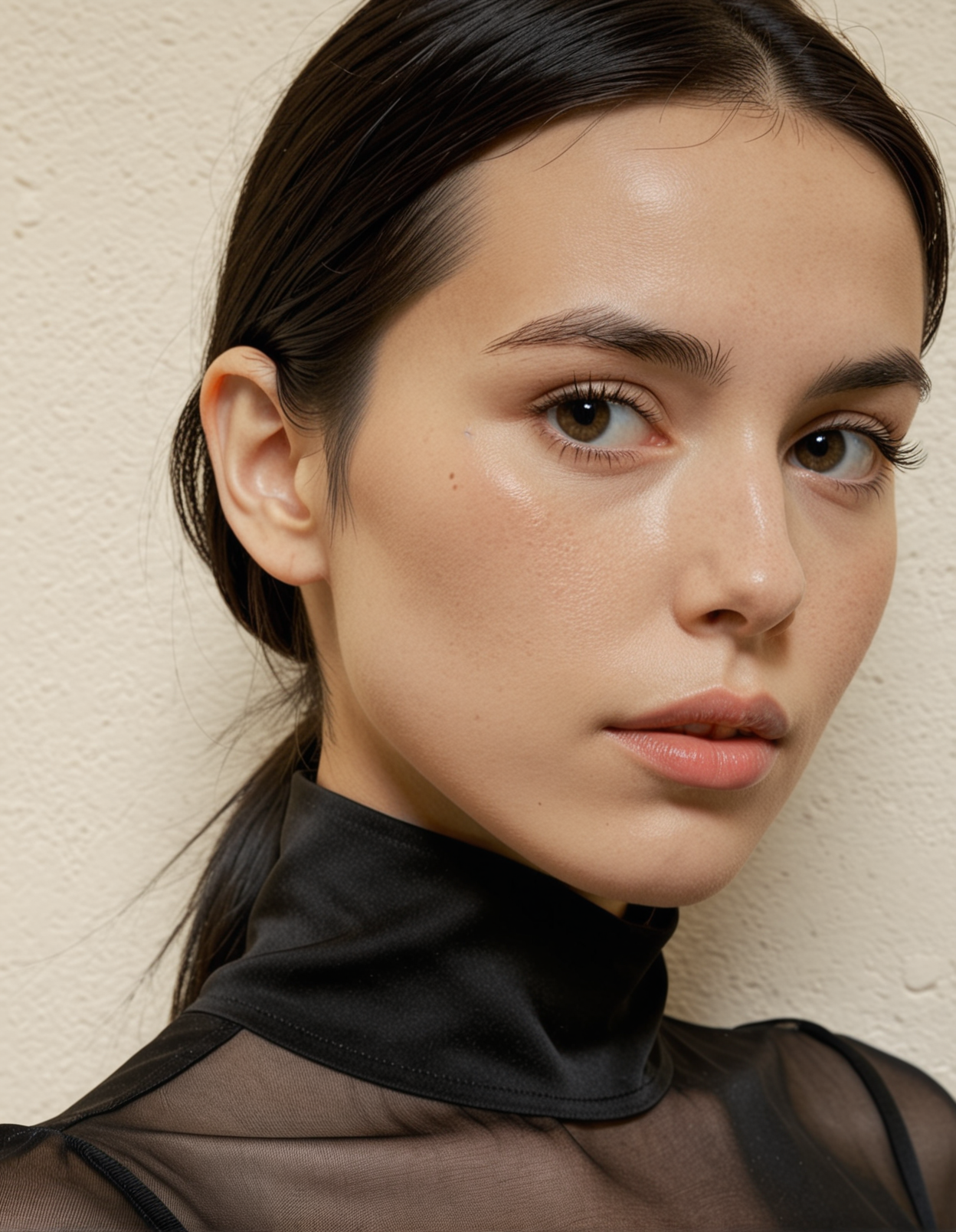
Prompt: frauke1 frauke_gesicht frauke_koerper <lora:dmd2_sdxl_4step_lora_fp16:1> <lora:light_contour_sdxl:1> ltctr close-up, ¾ view, thoughtful gaze, blouse, cinematic lighting, plain wall background Steps: 10, Sampler: LCM, Schedule type: Karras, CFG scale: 1, Seed: 3265010453, Size: 896x1152, Model: epicrealismXL_vxviiCrystalclear, Highres Denoising strength: 0.1,Hires steps: 2, Hires upscaler: remacri_original
other Example images in Attachments, Frauke.Zip
For the image generation prompt, it's important to use all three embeddings, regardless of whether you want to create portraits or full-body images. Ideally, place them first in your positive prompt.
Quickly create prompts for the dataset:
That's the easiest part: ask an AI. Attached is a text file with the prompt I used to create the dataset prompts. It might need some adjustments. Thanks to kalitexAI: The bounty description for FOX 50 was extremely helpful for creating the systemprompt and the dataset for FOX 50 was my first attempt at such a workflow.
It's important that your prompts, apart from the embeddings, contain no references to the person's appearance, but only information about lighting, pose, clothing, angle, focal length, and such things.
creating the dataset This is also quite easy with ForgeUI; I have no idea how you can achieve such simplicity with other platforms.
1. Create a style (style editor, on the far right below the generate button):
Syntax: embedding1 embedding2 embedding3 {prompt} references for light, quality and what else you like
The Style I used: style-name: Frauke breathtaking frauke1 frauke_gesicht frauke_koerper {prompt} UHD, 32k
2. Your Prompts:
Leave the prompt field blank except the LoRAs you might use.
In the txt2img tab, you'll find the script menu at the very bottom. Choose 'Prompts from file or textbox' choose insert prompt at the 'end' Copy and past all the AI-created prompts into the text-field
3. Adjust your settings to Highres, perhaps batch-count 2 for a wider selection.
4. press generate and wait
5. Either find the images great or throw them into the trash.
You might discover that you need to adjust your system prompt for better txt2img-prompts or that your embeddings are too generic. Start over and do some test renders before you run all that mess through your computer again.
6. Leave a comment or anything else.
Message me if you have any questions.