

Is there a style that doesn't have a lora yet, but you don't know how to train one? Look no further.
A decent amount of people have been asking me what settings I use to train my loras, so this article will detail the steps I take. This is also useful if you've ever wanted to get into training but didn't know how to start. Fair warning though, my method tends to cost around 2k buzz, so if you aren't prepared to drop that much then this may not be fore you.
Two things before I start though:
This is specifically for style loras. I have 0 experience with concept loras and character loras. It might work, it might not.
This isn't the most technically savvy guide. I don't know what more than half of the lora settings actually do, I just know that they do good things. This is a guide by a dummy for dummies.
Step 1: Gathering Images
You typically want to get around 100~200 images. Ofc ones without watermarks are preferred, but if you don't care that much about it then it isn't necessary. If you want to grab images in mass, download this image grabber off of github. Alternatively, you can just download images by hand yourself. 200 may seem like a lot, but if you've got free time just turn some music on and turn your brain on autopilot. I also tend to avoid getting any monochrome/greyscale/lineart images since they don't train the best. TRY TO AVOID GETTING REPEAT IMAGES.
When pulling images off of R34 through the image grabber, I typically use these keywords to avoid anything unneeded.

If you want to crop watermarks out of the images, use this bulk image cropper. This also takes some time, as if the watermark is in a unique place then you have to do it manually.
If you want to gather images from animated artists, you can use this video2png site, though this can actually take a decent amount of time. Its also pretty much the #1 reason I typically don't do animated artists' styles.
Step 2: Tagging
When tagging images, you don't want to go overboard and dump too much on them. I typically use the auto tagger, as it usually knows best. Though, always go back over your images to see what it missed/added. If you want to bake in characters to the lora, just add the character's name to whatever image they're in (you can also add their features but unless it's super unique it's not always required.) As for trigger words, unless it's 3d, I don't add anything. This is personal preference, and you can act differently.
Also don't try adding any tags that go against Civit's TOS, as it'll just refuse to train the lora.
Step 3: Settings
This is probably what most of ya'll are here for; the meat and potatoes if you will. I use separate settings for both pony and illustrious, so I'll tell you each. If I don't specify a setting here, then I usually just don't touch it. You can mess with those if you want.
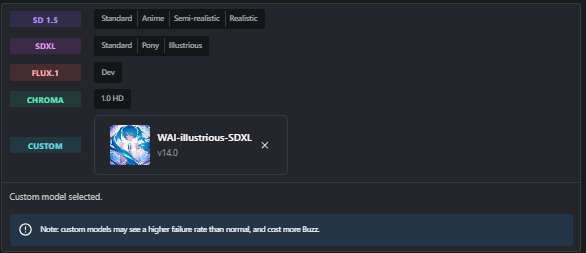
If you're training for Illustrious, DO NOT use the base Illustrious model as it's WHACK. Instead, click "Select custom model" and select WAI-illustrious-SDXL. This is the one I train with (though I typically use v14 cause I'm stubborn and stupid. You don't have to do this.)
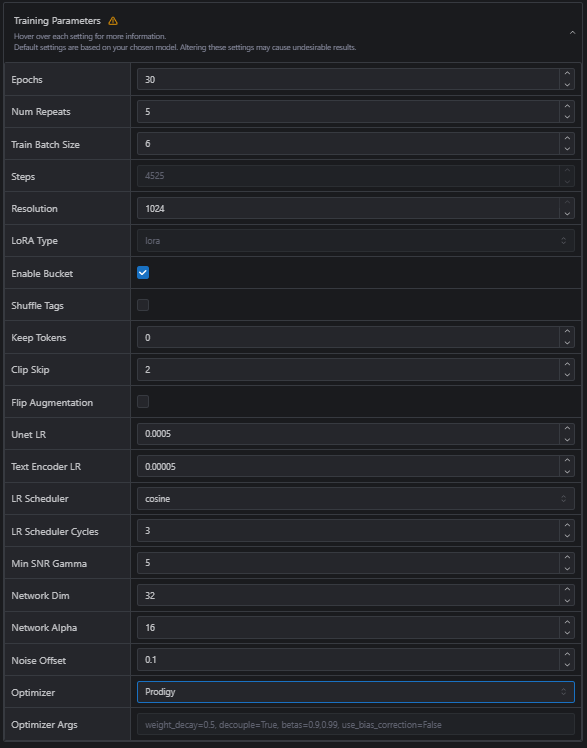
Epochs: 30 for Illustrious/20 for Pony
Repeats: 4-6 for Illustrious/4 for Pony
Batch Size: 6 for Illustrious/5 for Pony (they're usually just set as this by default so you can ignore this.)
Resolution: 1024 for both
Enable Bucket: Yes for both
Shuffle Tags: Depends on if I'm training a character with a specific appearance. Usually yes for both.
Keep Tokens: If shuffle tags are enabled, set this to 1
Clip Skip: 2 for both
Optimizer: Prodigy for both (Pony is set to this by default)
If you've done everything correctly, you should be looking at around 4000+ steps on Illustrious and 2000+ steps on Pony. Don't be afraid to go higher, as there's no such thing as too many steps (don't quote me on this.) Again, everything should look like this: