
Hey, did you know that you can use Krita as a UI for ComfyUI workflows? I've been generating for almost a year using both ComfyUI and Krita image editor and I just figured this out! So now I will share it in case there are other people in the dark like I was.
I have two workflows attached. Just like my previous article, one is for T2I and/or I2I with or without control net. The second one is for inpainting. Both form a closed loop with the Krita canvas, taking it as the input and spitting out new images either as new layers or by overwriting (this blew my mind, but it's literally how Krita designed it to be used so feel free to ignore my bold text). This allows for much faster iterations than what I was doing before, and also gives me a lot more control over selections during inpainting than ComfyUI has natively. Krita AI is fun to play with too, but it doesn't have the same power or flexibility that Comfy has IMO (the most annoying thing is that you can only change CFG in the settings menu).
Setup Guide (assuming you can already use Comfy and Krita individually, but glad to help with that too in DMs if you're that ambitious):
Follow the steps here to install and configure Krita AI
Boot up a ComfyUI instance or connect to one remotely. Do not open the workflow yet.
Ensure your Krita is connected to the same ComfyUI instance by clicking the settings button on the upper right of the AI interface
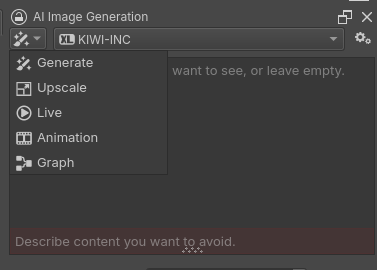
Click on the paintbrush icon and select "Graph"
In the ComfyUI interface, open a Krita-enabled workflow (one with a Krita output node)
Krita should automatically detect the workflow and change its interface, for example with the inpainting workflow it should look like this:

if it doesn't, try moving some nodes or changing the workflow somehow on the ComfyUI side to get it to refresh
ComfyUI is now detecting your canvas (whatever is visible in the main Krita window) and when you hit generate it will take that image for I2I or inpainting. You can change how it returns images in the settings under Interface:

A few of other important notes:
Type prompts into the ComfyUI interface. I tried sending it to the Krita UI but it would only give me a single line, which was annoying.
The first workflow has a switch:

1 = Text-to-Image
2 = Image-to-Image
Controlnet can be used in the first workflow and will automatically generate strength and end percent sliders in the Krita UI if you enable it. It will use whatever layer you have named "Control Net" (possibly case-sensitive) as the control net.
Inpainting in the second workflow uses whatever you have selected in Krita as the mask. This is big for me because I like to do lots of iterations and I hate having to re-import the new image and remask it every time. Now I can just leave the selection on (or save it to a selection mask) and go nuts with whatever on the image without losing it.