

If you’re generating **coarse 3D meshes in ComfyUI** (for example with **Hunyuan3D-2.1**) and want to push them to **production-quality geometry**, this project wraps **UltraShape 1.0** into native ComfyUI nodes — fully integrated, batch-friendly, and workflow-ready.
This is a **community ComfyUI wrapper** around the official UltraShape implementation from PKU-YuanGroup.
---
## 🔥 What Is UltraShape?
**UltraShape 1.0** is a **two-stage diffusion-based mesh refinement model** designed to transform **coarse 3D meshes** into **high-detail, clean geometry**.
It focuses on:
* Adding **high-frequency geometric detail**
* Improving **surface smoothness**
* Enhancing **mesh topology**
* Preserving the original object structure
UltraShape is especially powerful when paired with **image-to-3D pipelines** like Hunyuan3D.
**Typical pipeline:**
```
Input Image
↓
Hunyuan3D (coarse mesh)
↓
UltraShape (refined mesh)
↓
GLB / OBJ / Production Asset
```
---
## 🧩 What This ComfyUI Node Pack Adds
This repository exposes UltraShape as **first-class ComfyUI nodes**, making it easy to drop into existing 3D workflows.
### Included Nodes
* **LoadUltraShapeModel**
* **UltraShapeRefineFromHunyuan**
* **UltraShapeRefine (from mesh path)**
### Key Features
✅ Seamless integration with Hunyuan3D
✅ Supports **batch processing**
✅ Works with existing ComfyUI 3D nodes
✅ No scripting required
✅ Docker image available with all dependencies preinstalled
---
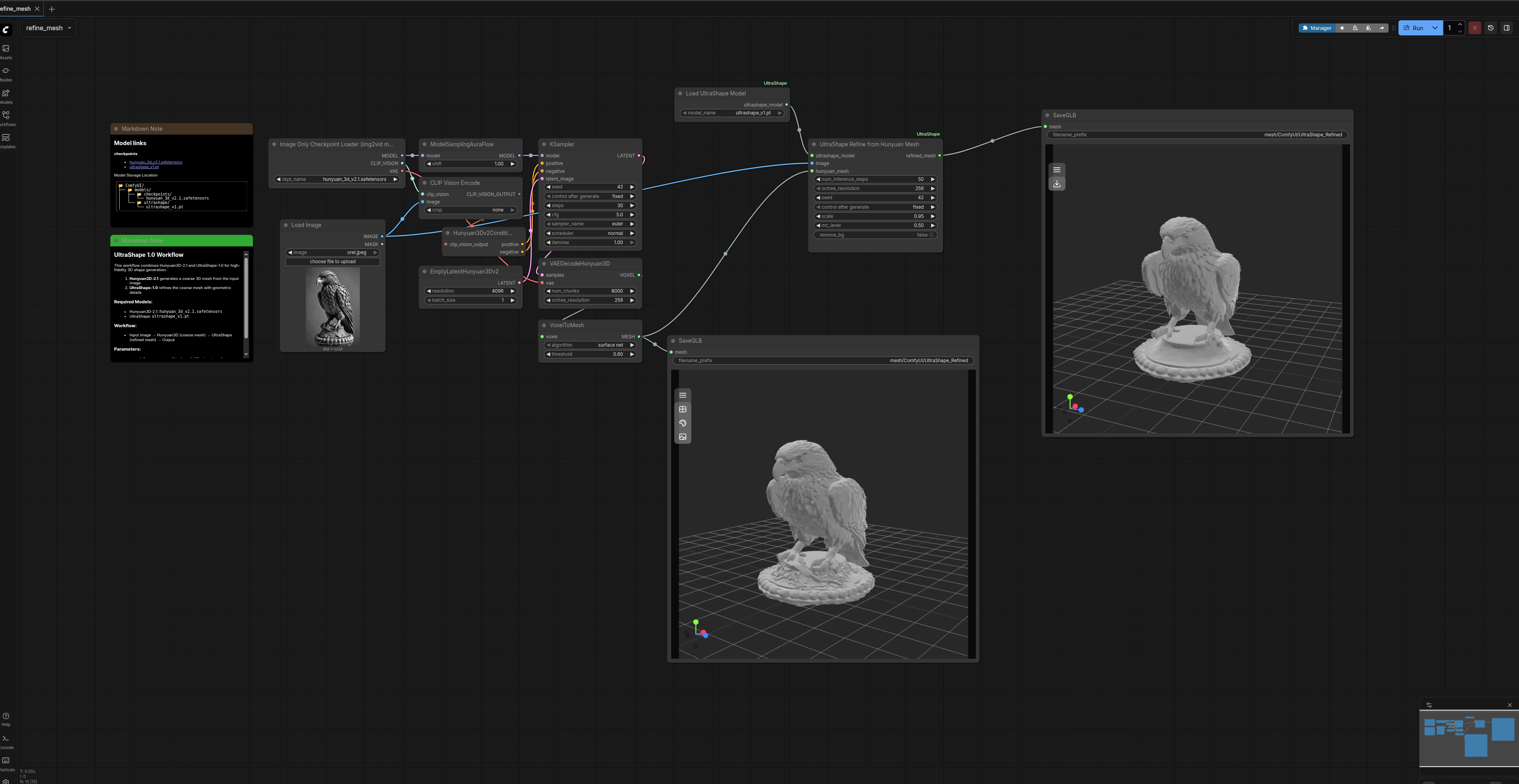
## 🖼 Example Workflow
**Hunyuan3D → UltraShape refinement → Export**
> 📌 Replace this image with your actual workflow screenshot
```
```
You can also download the exact workflow JSON used here:
👉 **Example Workflow JSON**
`3d_hunyuan3d-ultrashape-v2.1.json`
---
## 🧠 How UltraShape Refines Meshes
UltraShape operates on an existing mesh and:
* Converts it into a voxel representation
* Runs a **two-stage diffusion refinement**
* Reconstructs the surface via **marching cubes**
* Outputs a significantly more detailed mesh
Unlike remeshing tools, UltraShape **adds real geometric detail**, not just smoothing.
---
## ⚙️ Installation
### Option 1 — ComfyUI Manager (Recommended)
1. Install **ComfyUI Manager**
2. Open Manager → Search for **UltraShape**
3. Click **Install**
4. Restart ComfyUI
---
### Option 2 — Manual Install
```bash
cd ComfyUI/custom_nodes
git clone --recursive https://github.com/hahihula/ComfyUI-UltraShape.git
```
If already cloned without submodules:
```bash
cd ComfyUI-UltraShape
git submodule update --init --recursive
```
Restart ComfyUI afterward.
---
## 🐳 Docker (One-Command Setup)
A prebuilt Docker image is available with everything configured:
```bash
docker pull hahihula/comfyui-ultrashape:latest
docker run --gpus all -p 8188:8188 \
-v $(pwd)/models:/opt/comfyui/models \
-v $(pwd)/output:/opt/comfyui/output \
hahihula/comfyui-ultrashape:latest
```
**Included:**
* ComfyUI v0.6.0
* PyTorch 2.8.0 + CUDA 12.8
* Flash Attention
* All UltraShape dependencies
* Optimized for RTX 3090+
---
## 📥 Model Download
UltraShape requires a separate model checkpoint:
```bash
mkdir -p ComfyUI/models/ultrashape/
wget https://huggingface.co/infinith/UltraShape/resolve/main/ultrashape_v1.pt \
-O ComfyUI/models/ultrashape/ultrashape_v1.pt
```
---
## 🧪 Usage in ComfyUI
### Basic Node Setup
1. **LoadImage**
2. **Generate coarse mesh** (Hunyuan3D-2.1)
3. **LoadUltraShapeModel**
4. **UltraShapeRefineFromHunyuan**
5. **SaveGLB**
```
LoadImage
↓
Hunyuan3D
↓
LoadUltraShapeModel → UltraShapeRefineFromHunyuan → SaveGLB
```
---
## 🎛 Important Parameters
### UltraShapeRefineFromHunyuan
* **num_inference_steps** (default: 50)
Higher = more detail, slower
* **octree_resolution** (default: 1024)
Controls mesh detail & VRAM usage
* **scale** (default: 0.99)
Mesh normalization (important!)
* **remove_bg**
Useful for noisy image inputs
---
## 🚀 Performance & VRAM Tips
| Setting | Effect |
| ----------------------- | --------------------------------- |
| octree_resolution = 512 | Faster, less detail |
| steps = 30–40 | Good quality / speed balance |
| VRAM | 12GB minimum, 16–20GB recommended |
**RTX 3090 @ 1024 resolution:**
~9–10 minutes per mesh (50 steps)
---
## 🧱 Example Output
> 📌 Insert before/after mesh preview here
```
[ INSERT EXAMPLE MESH RENDER / VIEWER IMAGE ]
```
---
## 🐛 Common Issues & Fixes
**`No module named 'ultrashape'`**
→ Run `git submodule update --init --recursive`
**Out of Memory**
→ Lower `octree_resolution` or steps
**Broken mesh output**
→ Try `scale = 0.95` or regenerate coarse mesh
---
## 🔗 Links & Credits
* **ComfyUI Wrapper**
[https://github.com/hahihula/ComfyUI-UltraShape](https://github.com/hahihula/ComfyUI-UltraShape)
* **UltraShape (Official)**
PKU-YuanGroup / UltraShape-1.0
* **Paper**
*UltraShape 1.0: High-Fidelity 3D Shape Generation via Scalable Geometric Refinement*
* **Hunyuan3D-2.1**
Tencent Hunyuan
---
## 🙏 Acknowledgements
* PKU-YuanGroup for UltraShape
* Tencent for Hunyuan3D
* ComfyUI community for the ecosystem
---
## ⭐ Final Notes
This is a **community-created ComfyUI wrapper**, not an official release from the UltraShape authors.
If you find it useful, consider **starring the repo** and sharing your results on Civitai.
Happy meshing 🧊🧠