





Preface
I am working now for round about four weeks on my own set of AUTOMATIC1111 extensions. After understanding how Gradio programming works, it is easy to adapt existing concepts to different topics.
One missing Extension was an Extension, with which I can modify LoRA data in an arbitrary way. I programmed quick and dirty such an Extension using one of my old Extensions.
Motivation
The existing Extension for the described task was not working. Next to the fact that the Extension was not working is the fact, that the LoRA are not sorted in a proper way. With the amount of LoRAs I now have, this is a problem.
I am now able to solve several open problems at once. One open issue was the fact, that I need a tool to change the training steps in the metadata. Now I am also able to delete not necessary tags from the metadata.
What the Extension Does
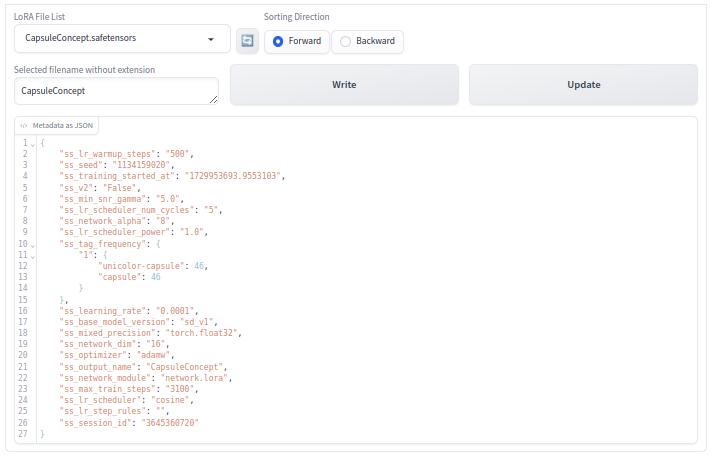
The Extension reads a LoRA, which was selected using a dropdown menu. Then one can change the JSON data in the text box. Using the button Write writes the data to the hard disc. In parallel a backup file with the extension .bak is written. Using the button Update, it can be checked, if the operation was successful. The file will be read again and one should see the modified data now new loaded in the text box.
Installation
The installation link is
https://github.com/zentrocdot/sd-webui-lora_metadata_modifierCross-Check
With my extension sd-webui-lora_metadata_viewer a cross check if the new extension works as expected is possible. Use this extension to load the modified LoRA model. If this is working without error, the new extension works as expected.
To-Do
I need mor test, if I have overseen some problems. It is also necessary to write a documentation, as I did for the other Extensions. I still have to optimise and tidy up the code itself.
if the tag "ss_tag_frequency" is removed from the JSON data, afterwards the value in the metadata is 'null'. This has to be fixed in a way, that the tag disappears.
Open Issue
The error
safetensors_rust.SafetensorError: Error while deserializing header: InvalidHeaderDeserializationis an open issue for the moment. See my article for the problem [3].
The conclusion so far also based on previous experience is as follows. JSON is not Python JSON and LoRA JSON is not JSON. See [5,6] for the JSON specification. Usage of single and double quotes leads to the problems in writing, reading and parsing of the JSON data in the metadata of the LoRA models.
What you see in the text box is correct JSON. Then Python mixes single and double quotes. At the end must be in the LoRA JSON sometimes escaped double quotes, which is not JSON standard.
In principle the name/value pair with the tag "ss_tag_frequency" is the problematic part of the metadata. I wrote some Python code for testing the original metadata from a LoRA model and the remaining problem is all the the time the tag "ss_tag_frequency" with its nested structure. The other tags can be handled easily.
As far as I can see, the problem is that the value for the tag "ss_tag_frequency" itself is a string and not a nested structure, which should not be the case according to the JSON specification.
My workaround is reading the value (string) to the key (ss_tag_frequency) and is then storing back the original string. So the back slashed double quotes in the string are preserved. Not doing this they are mangled from the metadata.
Remarks
Use the Extension on your own risk. Before using the Extension, make a backup of the LoRA you want to modify. This is a statement for security reasons. When you are sure that my Extension works, than this statement is no longer valid.
Important Remark
During intensive testing of this new Extension I got two error messages:
safetensors_rust.SafetensorError: Error while deserializing header: InvalidHeaderDeserialization
safetensors_rust.SafetensorError: Error while deserializing header: MetadataIncompleteBuffer
Both errors occur only when the modified LoRA should be used in a Prompt. Within the Extensions no error occurs.
The first problem should be solved by a workaround. The second problem was a consequential error due to the first error. I am not really happy with the workaround I am using at the moment. Especially the the first error and the workaround needs more investigation to handle this problem in a better or correct manner. See [4] for details to both errors.
The following now works well, as far as I have tested it:
E.g. change
"ss_max_train_steps": "3000",to
"ss_max_train_steps": "1000",It is also possible to add tags as well as remove tags from the metadata. Nevertheless more tests are necessary.
Final Words
Have a nice day. Have fun. Be inspired!
Reference
[1] https://github.com/zentrocdot/sd-webui-lora_metadata_modifier
[2] https://github.com/zentrocdot/sd-webui-lora_metadata_viewer
[3] https://civitai.com/articles/7336/notes-on-the-error-message-invalidheaderdeserialization
[4] https://docs.rs/safetensors/latest/safetensors/tensor/enum.SafeTensorError.html
[5] https://ecma-international.org/publications-and-standards/standards/ecma-404/
[6] https://datatracker.ietf.org/doc/html/rfc7159.html
[7] https://github.com/huggingface/safetensors