
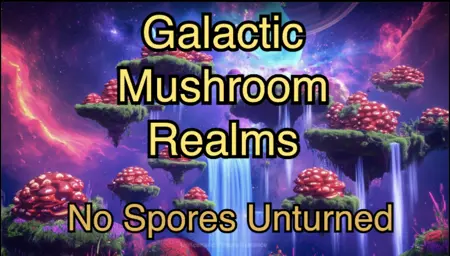
I have an image generated by SD3 which I added some text over using some editor, but the text doesn't blend well into the image and its not as the same fidelity as the background, making it stick out and look kinda ugly.
I know currently that text rendering is not perfect in any model (SD3 is ok but still sucks), is there any way I can take this image with the super-imposed text and blend them together so the text looks more natural/styled for the image? and since the text already exists, the model doesn't need to struggle with spelling/generating it.
Here is a demo image: https://i.imgur.com/FZUz3yJ.png
Closest I've gotten so far is passing the image through a creative-upscaler like https://replicate.com/philz1337x/clarity-upscaler, results are not bad but I'm sure there is a way to do better.
Offering a bounty for anyone who helps me figure out how to blend this in a way that the resultant image looks like the text was natively rendered into it. Best output + workflow wins! Please post your output image using my input so I can evaluate results