


Styles LoRA based on IllustriousXL and NoobAi, inspired by the way I visualized characters from chatbots, visual novels, and choice-based games. This LORA tend to handle semi-real artstyle.
Using FallenIncursio's PaSanctuary/Incursio's Meme Diffusion model will get the more realistic result while other Pony, Illustrious and NAI will remain anime styles
Recommended weight and settings:
0.7 - 1.0 / 0.3 - 1.0 (v4)
Steps: 24 - 36
Sampler: Euler a
CFG Scale: 4
Version 4 Test:
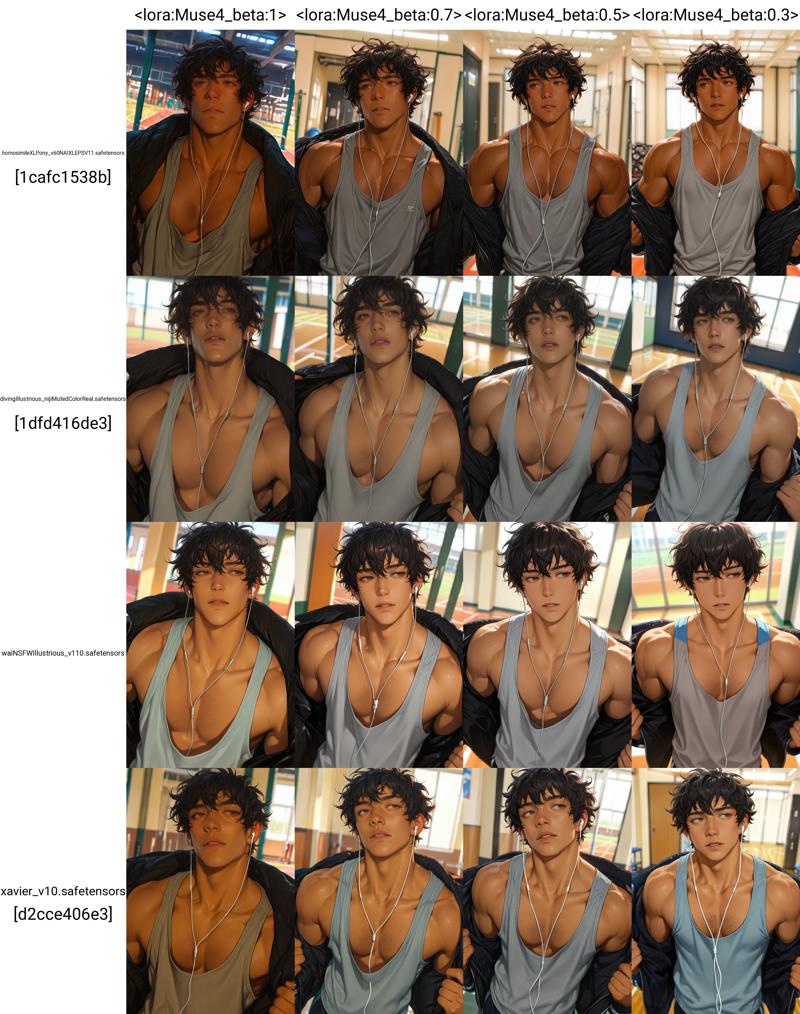

Triggered Prompt: muses_in_dark
Extended Prompt:
dark theme, low light, realistic, inconsistent lighting,
realism, semi-realism (v3-v4 only)
Note: Be aware! Mixing too much LORAs may cause derailment on the main style of the model and LORA itself.
Recommended Settings for Advanced Usage:
To achieve the best quality and distinct artistic styles, I recommend the following configurations. These settings utilize "anti-burn" tools to allow for higher CFG scales without degrading the image.
I do not recommend using DPM++ samplers with Karras, as this combination often causes artifacts or distorted results.
1. ComfyUI Configuration
Prerequisite: Install the Skimmed_CFG node by Extraltodeus, This node prevents image "burn" at high CFG scales.
Choose one node: 'Skimmed CFG'; 'Skimmed CFG - replace'; 'Skimmed CFG - linear interpolation'; 'Skimmed CFG - linear interpolation dual scales'
Skimming Scale: 4/6
Main CFG Scale: 8/10/12
Steps: 24 - 36
Sampler: Euler ancestral
Schedule Type: Exponential, Normal, Align Your Steps.
2. A1111 / ForgeUI Configuration
Prerequisite: Use Dynamic Thresholding by mcmonkeyprojects. (Note: This is a built-in feature in ForgeUI, but must be installed as an extension in A1111.)
General Generation Settings:
Steps: 24 - 36
Sampler: Euler a
Schedule Type: Exponential/Polyexponential, Normal, Align Your Steps.
Main CFG Scale: 8/10/12
Dynamic Thresholding Settings:
Click on Enabled in Dynamic Thresholding's tab
Mimic Scale: 4/6
Threshold Percentile: 0.96 ~ 0.999 (never set it to 1)
Mimic Mode: Constant/Linear Down/Cosine Down/Power Down (your choice)
Mimic Scale Min: 1~3
CFG Mode: Constant/Linear Down/Cosine Down/Power Down (your choice)
CFG Scale Min: 1~4
Sched Val: 1
Everything else we can set either like this:

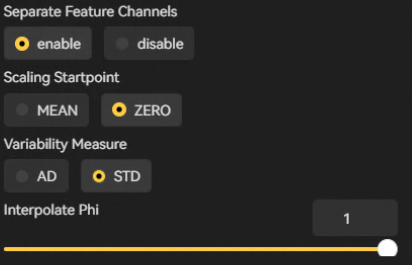
To further enhance image quality, consider using ADetailer and the Ultimate SD Upscale extension. Note that Ultimate SD Upscale is the only exception where DPM++ samplers are recommended.