


Updated: Aug 2, 2025
styleVerified: 9 months ago
SafeTensor

The FLUX.1 [dev] Model is licensed by Black Forest Labs. Inc. under the FLUX.1 [dev] Non-Commercial License. Copyright Black Forest Labs. Inc.
IN NO EVENT SHALL BLACK FOREST LABS, INC. BE LIABLE FOR ANY CLAIM, DAMAGES OR OTHER LIABILITY, WHETHER IN AN ACTION OF CONTRACT, TORT OR OTHERWISE, ARISING FROM, OUT OF OR IN CONNECTION WITH USE OF THIS MODEL.
Stylizes images with vintage film camera effects, often reffered to as "lomo" photography. FLUX does a pretty good job on its own without a LoRA for film photography. It can produce images with good depth of field, film grain, and even some soft focus.
I would say that FLUX on its own isn't great at capturing the styles from older camera models, but that's both good and bad. Of course this "lofi" photography often produces images that aren't quite as sharp. I own many vintage cameras and lenses and this was simply part of the deal - you have lenses that lacked multi-coating or just weren't as well made and then you even have some plastic lenses with this style of photography. I love the Diana F+ but it has a plastic lens and leaks light like crazy. That's of course the style. So you shouldn't really expect tack sharp images.
If you do want really sharp photos in addition to these kinds of styling defects, then you're probably better off simply taking a sharper image into a photo editor to apply such effects (DXO FIlmpack, Photoshop, etc.).
I plan to continue refining this LoRA and I'll probably make some separate specific ones. For example, I have a few of the Helios lenses that I love for the "swirly bokeh."
Recommended Settings
I would recommend using the following to get started.
Sampler: euler
Scheduler: beta
Steps: 20
Guidance: 3.0 (but somewhere between 2.8 and 6)
LoRA strength: 1.0
Resolution: 2MP (1408x1408 if square)
I think square resolutions work best and if you don't like what you see at 2MP, try 1MP (512x512).
I wouldn't say this model is unstable, but it does produce very different results which I quite like because that variation is the great thing about this style of photography. The settings that will have the most dramatic impact on variations, aside from the seed of course, are the resolution, guidance strength and the LoRA strength itself. Try a bunch of settings. Note that I've also had some good success with the ddim sampler.
Comparisons with and without the LoRA
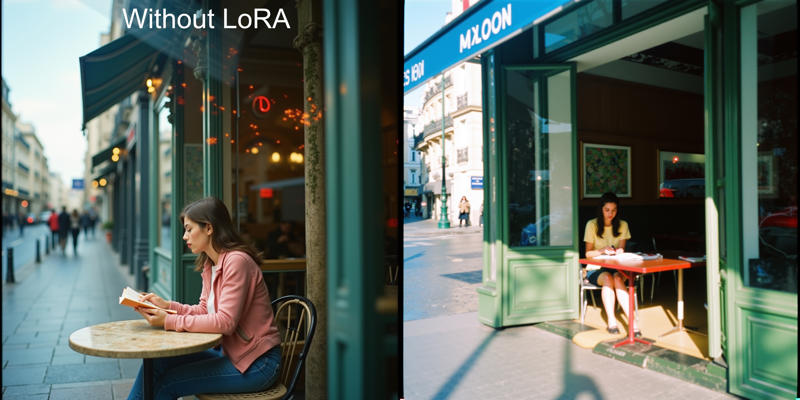 In this first example, you can see how FLUX already has a really nice photographic effect with its depth of field and colors. I might say more cinematic actually. On the right you'll see how this lomo style LoRA really reduced the sharpness and punched up the saturation. Yes, it changed the composition as well, but you different seeds and LoRA strength levels will randomly change that around.
You'll find a lot of variation with this LoRA and I've used it with strengths up to 4. At 5+ it gets cooked, you'll start to get weird patterns. Still, I was happy that it was usable at such high strengths and also down to 0.25 even. Though the happy spot is going to be around 1.0.
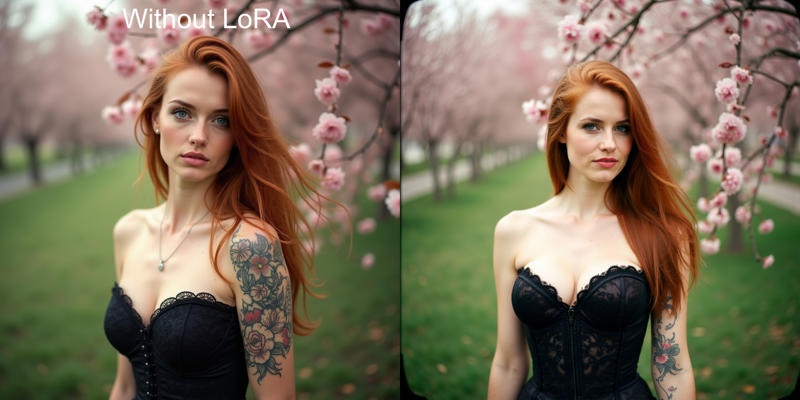 This is another great example and the differences are more nuanaced. Again, FLUX is great about depth of field and clarity. The model's tattoo is a bit better and her hair is flowing. However, the model looks a bit fake, plastic like or airbrushed. You can really see it in certain areas like her hair and around the eyes and eyebrows.
With the LoRA applied, the model has a much more natural look. There's some skin texture, that you can see in the areas that aren't over exposed, and hair and eyes are far better. Note that her hair isn't as volumous or flowing as much, but it presents a lot more naturally. Don't ask why the chest is larger, I didn't use any training data that would account for that but, I know it's a thing with this LoRA.
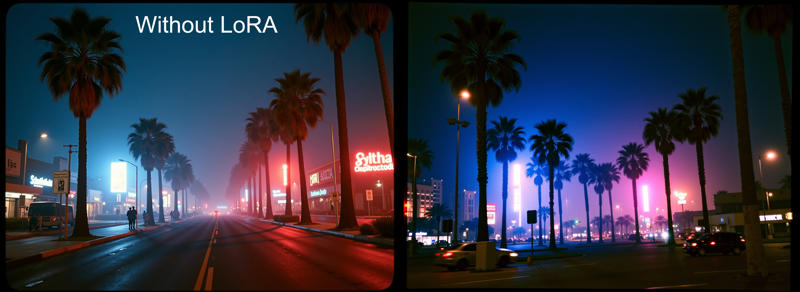 Here's another good example. You can see that FLUX actually can generate images with frame border effects from film. It isn't so hot with vignetting, in fact in most casts I see white vignettes or maybe haze around images when I prompt FLUX for vignettes. Still, FLUX on its own can generate a fair amount of imperfections and film border elements.
When using the LoRA, these effects are much more consistent and easier to produce (though they aren't present if you don't prompt for them, so you're not always stuck with them). In this particular example you can again see the increased vibrancy and saturation. There's some color splashing going on and things are a lot more punchy. It's hard to tell at this size here, but the film grain is more pronounced as well. FLUX can and does add film grain, but it's usually always finer.