Download
1 variant available


687
4.8K

The FLUX.1 [dev] Model is licensed by Black Forest Labs. Inc. under the FLUX.1 [dev] Non-Commercial License. Copyright Black Forest Labs. Inc.
IN NO EVENT SHALL BLACK FOREST LABS, INC. BE LIABLE FOR ANY CLAIM, DAMAGES OR OTHER LIABILITY, WHETHER IN AN ACTION OF CONTRACT, TORT OR OTHERWISE, ARISING FROM, OUT OF OR IN CONNECTION WITH USE OF THIS MODEL.

Simple Flux.1 Merger for ComfyUI
A custom ComfyUI node set for merging Flux.1-based models with intuitive control.
This extension provides both simplified group merging and expert per-layer control, including support for advanced difference-based merge modes. Basically the code was generated by ChatGPT.
Extract the zip file and place it in the costom_nodes folder. Or clone or download this repository into your ComfyUI custom_nodes/ directory:
git clone https://github.com/yourname/comfyui-simplified-flux1.git
Start ConfyUI and select the node from Add Node - Flux.1.
Not all models can be input. FP8 is usually fine, but quantized models such as NF4 and GGUF may cause errors. Also, models in different formats are converted to BF16 for processing, so errors may occur depending on the amount of VRAM.
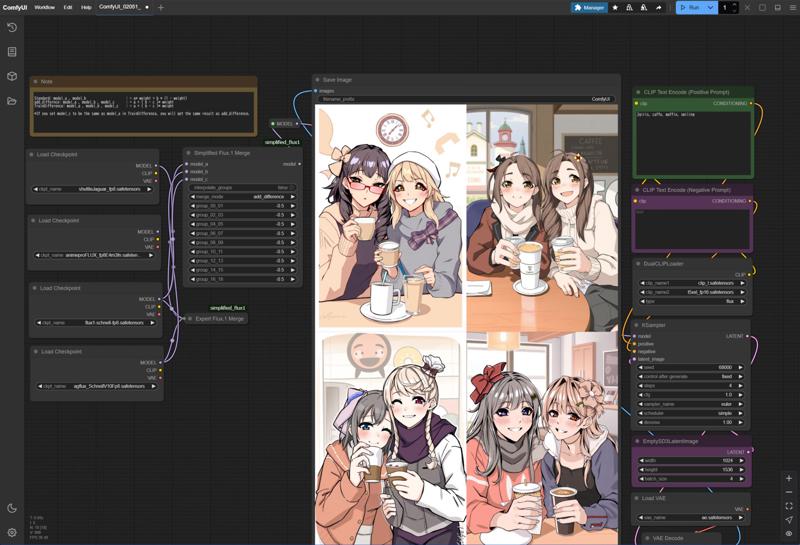
●Simplified Flux1 Merger
Compared to the normal Flux.1 merge tool, it is greatly simplified and operates with 9 sliders. Double blocks and single blocks are changed at the same time.
The values ??set for the layer group are the same, but if you use the interpolation mode, the steps between the adjacent sliders are smoothly interpolated to a certain extent.
Standard mode works the same as the normal merge tool, and model_a and model_b are composited at the weight value ratio.
x = model_a × weight + model_b × ( 1 - weight )
Model_c is not used in Standard mode, but it will not work unless something is connected.
The add_difference and TrainDifference modes are similar to those of SuperMerger, but the processing is probably quite different.
x = model_a + (model_b - model_c) × weight
●Expert Flux1 Merger
Simplified Flux1 Merger that supports all layers. All functions are the same except for the lack of interpolation mode.
These may be more useful for increasing the options when generating images, rather than for creating merge models.