Updated: Mar 4, 2026
base model


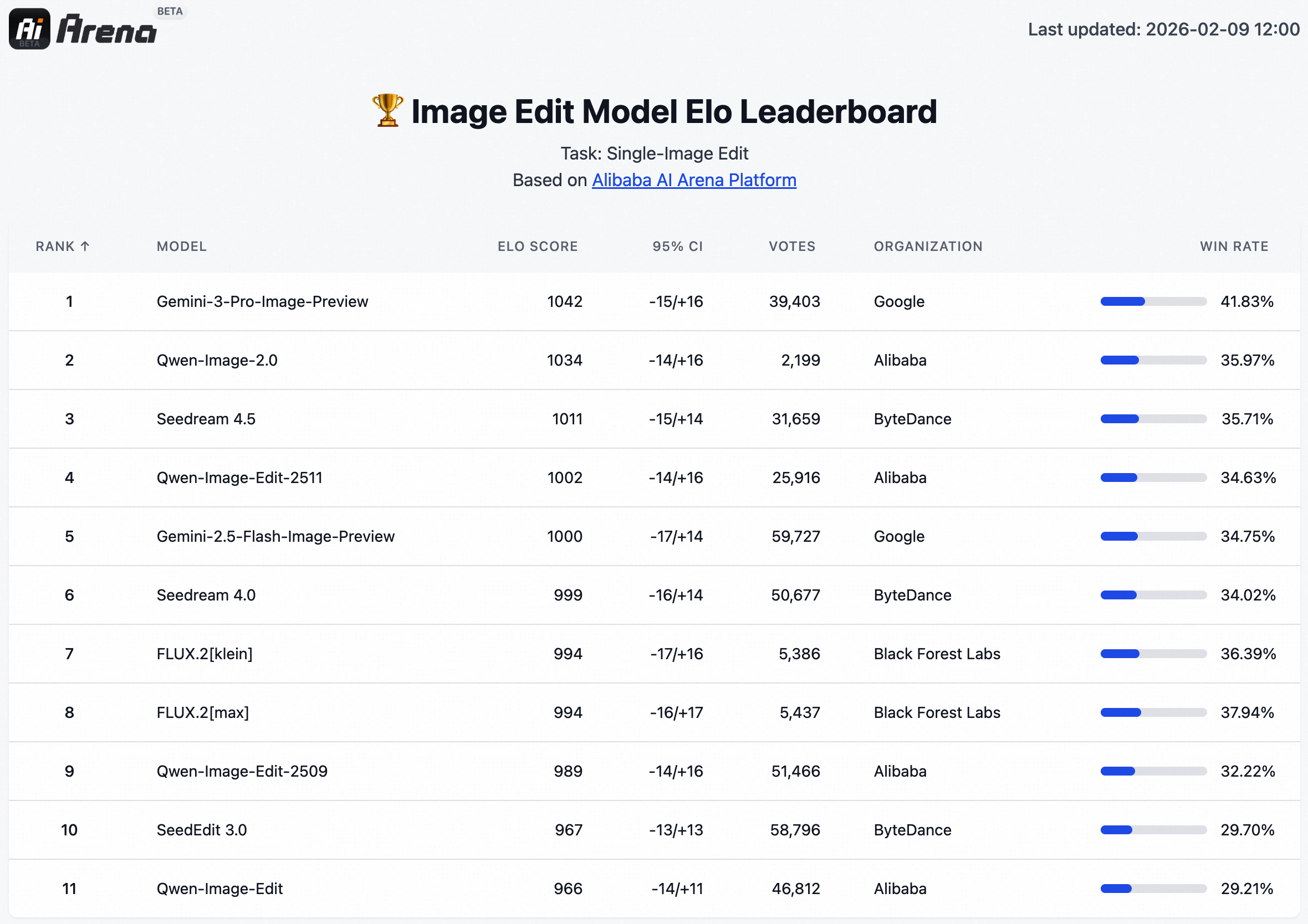
Qwen Image 2.0 is Alibaba's latest image foundation model from the Qwen team. It unifies text-to-image generation and image editing into a single 7B-parameter architecture. Despite being nearly 3x smaller than its predecessor, it ranks #1 on the AI Arena ELO leaderboard for both generation and editing tasks.
Originally posted to: https://qwen.ai/blog?id=qwen-image-2.0
We are launching Qwen-Image-2.0, a next-generation foundational image generation model. The key highlights of Qwen-Image-2.0 include:
Professional Typography Rendering: Supports 1k-token instructions for direct generation of professional infographics, including PPTs, posters, comics, and more.
Stronger Semantic Adherence: Native 2K resolution support for finely detailed realistic scenes, including people, nature, and architecture.
Improved Text Rendering: Integrated understanding and generation capabilities, unifying image generation and editing in a single mode
Lighter Model Architecture: Smaller model size with faster inference speed.
Model Performance
We conducted blind testing on AI Arena. Results show that Qwen-Image-2.0, as a unified generation-and-editing model, achieves superior performance on both text-to-image and image-to-image benchmarks using the same model.

Model Introduction
Before introducing Qwen-Image-2.0, let’s first review the evolution of Qwen-Image through a single-slide PPT:
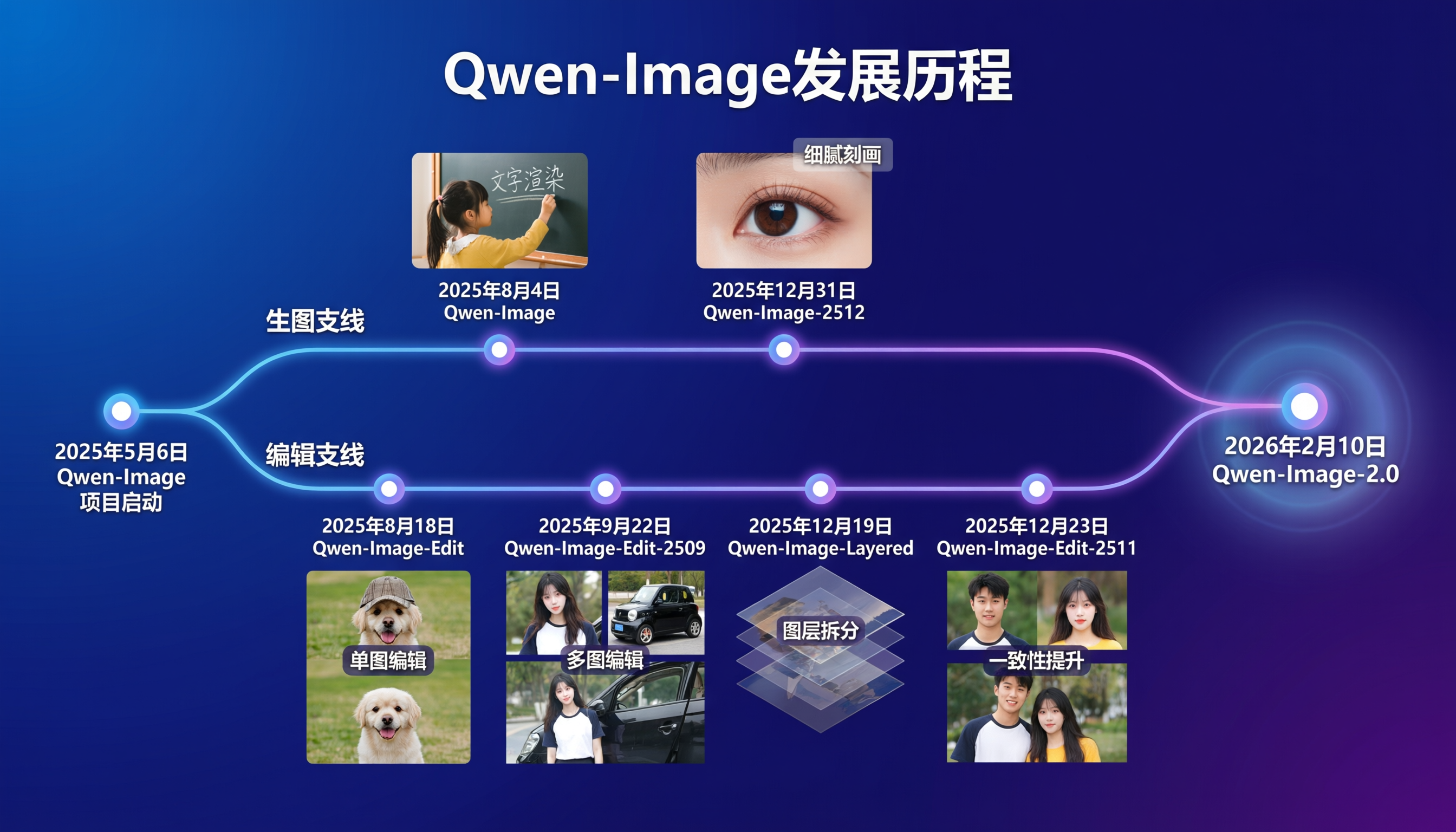
As shown in the slide, prior to Qwen-Image-2.0, we explored two parallel tracks: the generation track and the editing track. On the generation track, we focused on improving accuracy and realism in image synthesis—Qwen-Image (released in August) emphasized precise text rendering, while Qwen-Image-2512 (released in December) enhanced detail fidelity and photorealism. On the editing track, we explored functionality and consistency—from single-image editing in August, to multi-image editing in September, to consistency improvements in December. Today, Qwen-Image-2.0 successfully merges these two tracks into one unified model, delivering excellent results on both tasks simultaneously.
So, what are the practical strengths of this new model? Let’s revisit that PPT slide. Sharp-eyed readers may have noticed that the slide itself was not manually crafted—in fact, it was directly generated by Qwen-Image-2.0 using the following prompt:
一张深蓝色渐变背景的幻灯片。标题是“Qwen-Image发展历程”。下方一条发光时间轴,上面有多个节点。第一个节点是“2025年5月6日 Qwen-Image 项目启动”。之后分为两条支线:上方支线旁边写着"生图支线":支线上的节点包括“2025年8月4日 Qwen-Image”(上方有一个图片。一个小女孩在黑板上用粉笔写着"文字渲染")、“2025年12月31日 Qwen-Image-2512” (上方有一个细腻的眼睛特写图片,上方透明文本框写着"细腻刻画")。下方支线旁边写着"编辑支线":支线上的节点包括“2025年8月18日 Qwen-Image-Edit”(下方是一个组图,上面是戴帽子的小狗,下面是同一只小狗去除帽子的图,中间配有文字"单图编辑")、“2025年9月22日 Qwen-Image-Edit-2509”(下方是一个组图,上方左侧是女生、上方右侧是黑色小汽车,中间配有文字“多图编辑”,下方是女生依靠在车门旁)、“2025年12月19日 Qwen-Image-Layered”(下方是一个堆叠的透明多图层,中间配有文字"图层拆分")、“2025年12月23日 Qwen-Image-Edit-2511”(下方是一个组图,上方左侧是男生、上方右侧是女生,中间配有文字"一致性提升",下方是他们的合影。然后两个支线合二为一,变成一个新的节点“2026年2月10日 Qwen-Image-2.0”(大字号,周围光晕显著)。
Analyzing this slide reveals that Qwen-Image-2.0 can not only generate a dual-track timeline of development history and accurately render every piece of text, but also execute complex “picture-in-picture” compositions. For instance, in rendering the instruction “below is a composite image: the top shows a puppy wearing a hat, the bottom shows the same puppy without the hat,” the model not only completed the rendering but also maintained visual consistency between the two images. This precise “picture-in-picture” capability makes it significantly easier to create professional PPTs.
Beyond precision (“准”), another strength of Qwen-Image-2.0 is its capacity for complexity (“多”). With support for 1k-token instructions, the model can handle highly intricate rendering requests, such as the following exaggerated example:
这张图片展示了一份名为 AB Testing Results Report A/B测试结果汇报 的信息图表,内容分为左、中、右三栏。左侧栏标题为 Test Overview 测试概览。第一个板块标题是 Revenue Uplift 收入提升,中间以大号绿色字体显示 +¥237,000/月,下方括号内注明 (+¥237,000/Month),底部文字为 基于LTV模型 (Based on LTV Model)。第二个板块标题是 ROI 投资回报率,中间显示大号绿色数字 1:4.8,底部文字为 测试投入¥49,400 (Test Investment ¥49,400)。第三个板块标题是 Scalability Score 可扩展性评分,中间展示了一个绿色进度条图标,右侧数字为 4.7/5,底部文字为 已通过全站灰度验证 (Verified via Full-site Gray Release)。第四个板块标题是 Next Steps 下一步,正文第一行为粗体的 Q3全量上线 + 监控反向指标,第二行为 Q3 Full Rollout + Monitor Reverse Metrics: Churn Risk, Support Tickets)。中间栏标题为 Statistical Analysis 统计分析,各模块间通过黑色箭头表示流程关系。左上方的方框标题为 Test Objective 测试目标,内容是 提升注册转化率 (Boost Sign-up Conversion Rate)。箭头指向右上方的方框 Variant Design 变体设计 (A vs B),其中包含两个网页界面示意图,左侧灰色图下标为 A: Original Control,右侧带有绿色和橙色块的图下标为 B: New Variant。第二行左侧方框标题为 Traffic Allocation 流量分配,内容显示 Control A: 50% 和 Variant B: 50%。右侧方框标题为 Duration & Sample Size 持续时间与样本量,内容显示 28天 (28 Days), n=42,500/组 (Per Group)。第三行左侧方框标题为 Key Metric Tracking 核心指标追踪,下方有折线图、柱状图和秒表三个图标,分别对应标签 CTR,CVR,Avg. Session Duration。右侧方框标题为 Statistical Significance Check 显著性检验,内容为 p<0.05, 95% CI (Confidence Interval) Cohen’s d=0.32 (Small-Medium Effect)。第四行左侧方框标题为 Result Interpretation 结果解读,左侧列出了带有颜色圆点的条目:空心圆点 注册转化率,实心绿点 高率指率,空心圆点 实验跳出率,右侧有一个绿色箭头指向文字 Winner 获胜 (Significant Improvement)。流程图最终指向右下角的方框 Implementation Recommendation 落地建议,内有一个绿色对勾图标,文字为 Go Live 全量上线 (Roll out to 100%)。右侧栏标题为 Business Impact 业务影响,是一个三行两列的数据表。表头跨列标题为 Variant 变体,分为深蓝色背景的 Control A 对照组 A 和绿色背景的 Variant B 实验组 B。表格第一行左侧标签为 Conversion Rate 转化率,Control A 数据为 4.2%,Variant B 数据为 5.1%,中间有一个带 +21.4% 的绿色箭头指向右侧,Variant B 下方还有文字 p=0.003 ★ (Highly Significant)。表格第二行左侧标签为 Click-through Rate 点击率,Control A 数据为 12.7%,Variant B 数据为 14.9%,中间有一个带 +17.3% 的绿色箭头指向右侧,下方文字为 Δ=2.2pp (Percentage Points)。表格第三行左侧标签为 Bounce Rate 跳出率,Control A 数据为 58.1%,Variant B 数据为 52.6%,中间有一个绿色向下箭头,下方文字为 -5.5pp p=0.012 (Significant)。
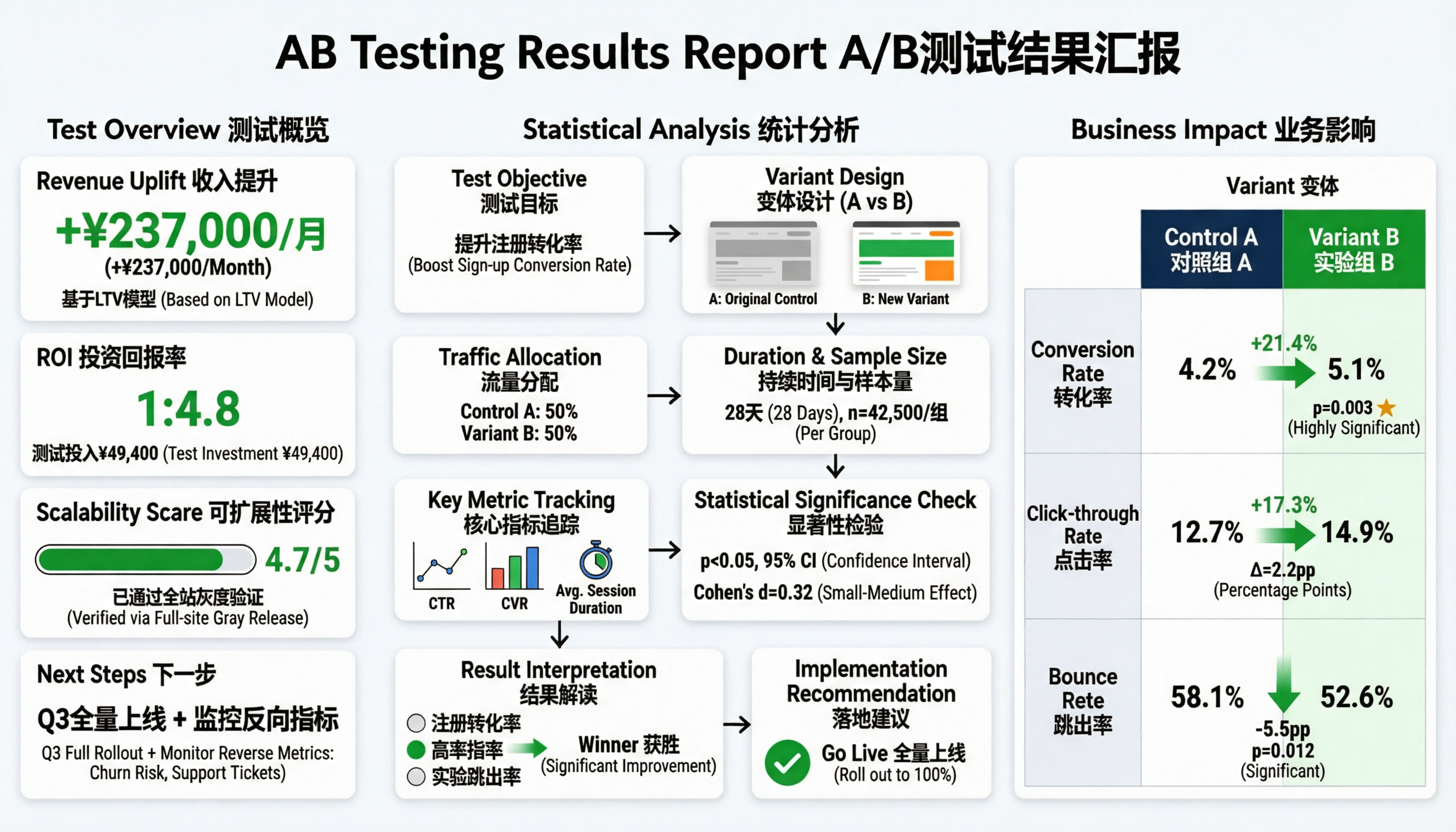
Readers might wonder whether such complex prompts are user-friendly. The truth is, thanks to the world knowledge embedded in LLMs, obtaining detailed descriptive prompts is actually quite straightforward. For example, given this simple input:
帮我生成一个手绘风格的杭州两日禅意人文之旅双语海报
We can feed it into an LLM for rewriting, leveraging its world knowledge to produce a richly detailed prompt like this:
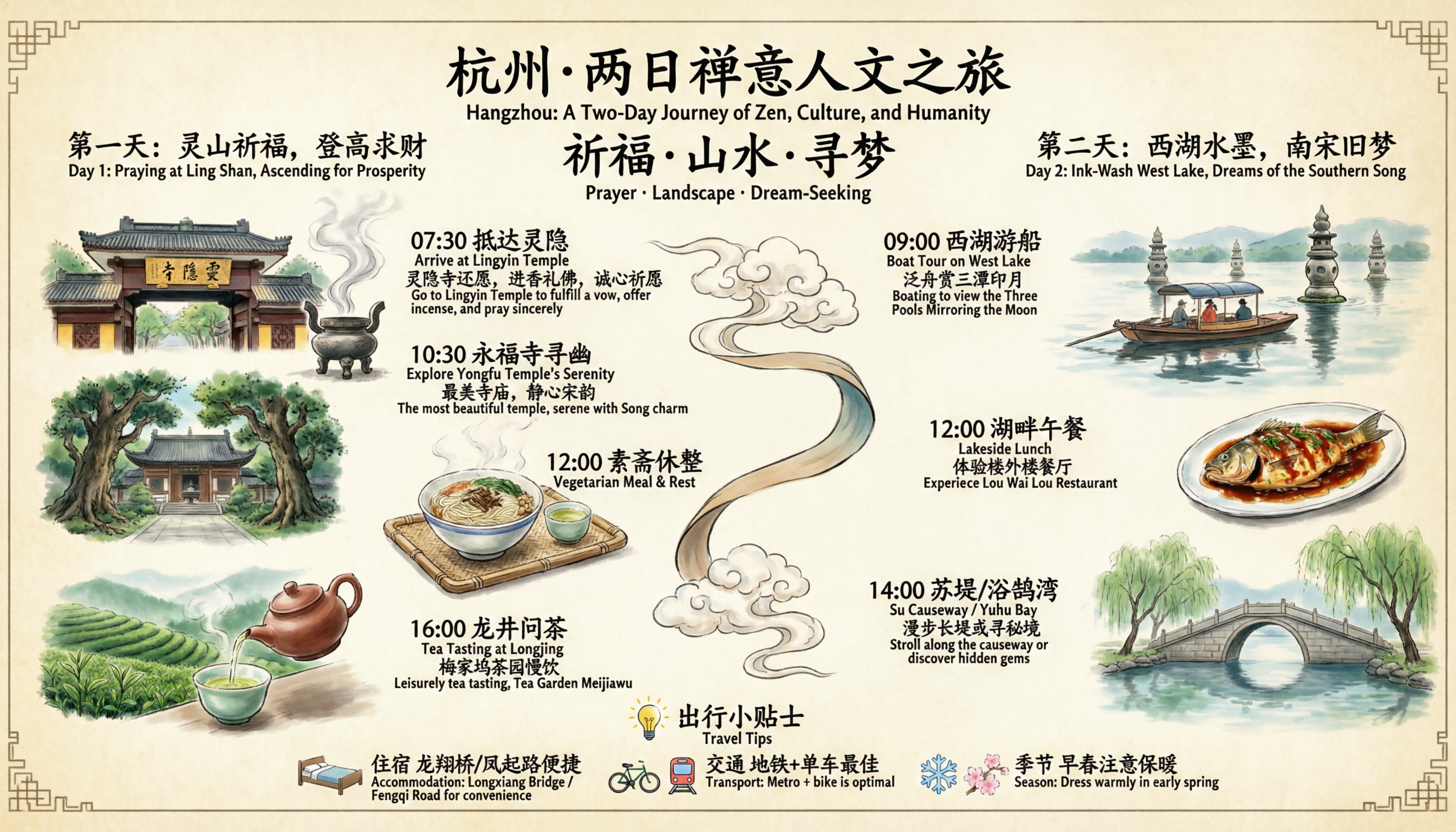
这是一幅中国风手绘风格的杭州两日禅意人文之旅行程导览双语海报,整体采用淡雅米黄色仿古宣纸背景,四角饰有传统回纹边框;画面中央以一条飘逸的云纹卷轴丝带贯穿连接两天行程,上方大标题为“杭州·两日禅意人文之旅”(“Hangzhou: A Two-Day Journey of Zen, Culture, and Humanity”),副标题为“祈福·山水·寻梦”(“Prayer · Landscape · Dream-Seeking”);左侧为“第一天:灵山祈福,登高求财”(“Day 1: Praying at Ling Shan, Ascending for Prosperity”),依次展示:“07:30 抵达灵隐”(“Arrive at Lingyin Temple”),配灵隐寺山门(牌匾写着"灵隐寺")与香炉袅袅青烟图,文字说明“灵隐寺还愿,进香礼佛,诚心祈愿”(“Go to Lingyin Temple to fulfill a vow, offer incense, and pray sincerely”);“10:30 永福寺寻幽”(“Explore Yongfu Temple’s Serenity”),配古朴寺院掩映于苍翠古树间图,文字说明“最美寺庙,静心宋韵”(“The most beautiful temple, serene with Song charm”);“12:00 素斋休整”(“Vegetarian Meal & Rest”),配一碗热气腾腾素面与小茶盏置于竹编托盘上图;“16:00 龙井问茶”(“Tea Tasting at Longjing”),配层叠翠绿茶园与紫砂壶向青瓷杯倾注茶汤图,文字说明“梅家坞茶园慢饮”(“Leisurely tea tasting, Tea Garden Meijiawu”);右侧为“第二天:西湖水墨,南宋旧梦”(“Day 2: Ink-Wash West Lake, Dreams of the Southern Song”),依次展示:“09:00 西湖游船”(“Boat Tour on West Lake”),配乌篷船泛舟湖上、三潭印月石塔倒影水中图,文字说明“泛舟赏三潭印月”(“Boating to view the Three Pools Mirroring the Moon”);“12:00 湖畔午餐”(“Lakeside Lunch”),文字说明“体验楼外楼餐厅” (“Experience Lou Wai Lou Restaurant”),配一盘色泽红亮的鱼,上面淋酱汁;“14:00 苏堤/浴鹄湾”(“Su Causeway / Yuhu Bay”),配拱桥横跨碧波、垂柳依依图,文字说明“漫步长堤或寻秘境”(“Stroll along the causeway or discover hidden gems”);底部设“出行小贴士”板块(“Travel Tips”),含灯泡图标及三项提示:“住宿 龙翔桥/凤起路便捷”(“Accommodation: Longxiang Bridge / Fengqi Road for convenience”),“交通 地铁+单车最佳”(“Transport: Metro + bike is optimal”),“季节 早春注意保暖”(“Season: Dress warmly in early spring”),每项前分别配床、自行车+地铁、雪花+樱花图标;全图文字均采用楷体书法风格,中英文严格对应排布——中文在上、英文紧随其下,整体构图疏密有致、意境悠远,充满文人画气息与禅意生活美学。
And it is precisely such complex descriptions that Qwen-Image-2.0 excels at rendering. Here is the resulting image:
Beyond precision (“准”) and complexity (“多”), aesthetic quality (“美”) is another hallmark of Qwen-Image-2.0’s text rendering. This “beauty” manifests in the layout and composition of text and images. For example, consider this prompt:
中国古典水墨长卷风格,竖幅构图,画面自上而下、自右向左以行楷题写柳永《雨霖铃·寒蝉凄切》全文(共12行,含标点与换行): “寒蝉凄切,对长亭晚, 骤雨初歇。都门帐饮无绪, 留恋处、兰舟催发。 执手相看泪眼,竟无语凝噎。 念去去,千里烟波, 暮霭沉沉楚天阔。 多情自古伤离别,更那堪、 冷落清秋节! 今宵酒醒何处?杨柳岸,晓风残月。 此去经年,应是良辰好景虚设。 便纵有千种风情,更与何人说?” 书法墨色浓淡相宜,飞白自然,笔锋遒劲中见婉转,行气连贯如流水;字迹略带微洇,仿宣纸渗透效果。背景为极简留白水墨意境:右下角绘一叶孤舟泊于浅滩,舟头微翘,缆绳轻系枯柳;左侧远景以淡墨晕染出层叠低垂的暮霭与空阔楚天,天际线处一抹青灰远山若隐若现;近景岸边斜出三两枝细柳,枝条纤柔,叶已疏落,承袭清秋萧瑟之气;柳梢悬一弯将隐未隐的残月,清冷微光映照薄雾中拂面的晓风痕迹(以几缕轻扬的柳丝与水纹示意)。整幅画气息沉郁隽永,哀而不伤,严格遵循宋词意境与传统文人画“诗书画一体”范式,无印章、无题跋、无现代元素。
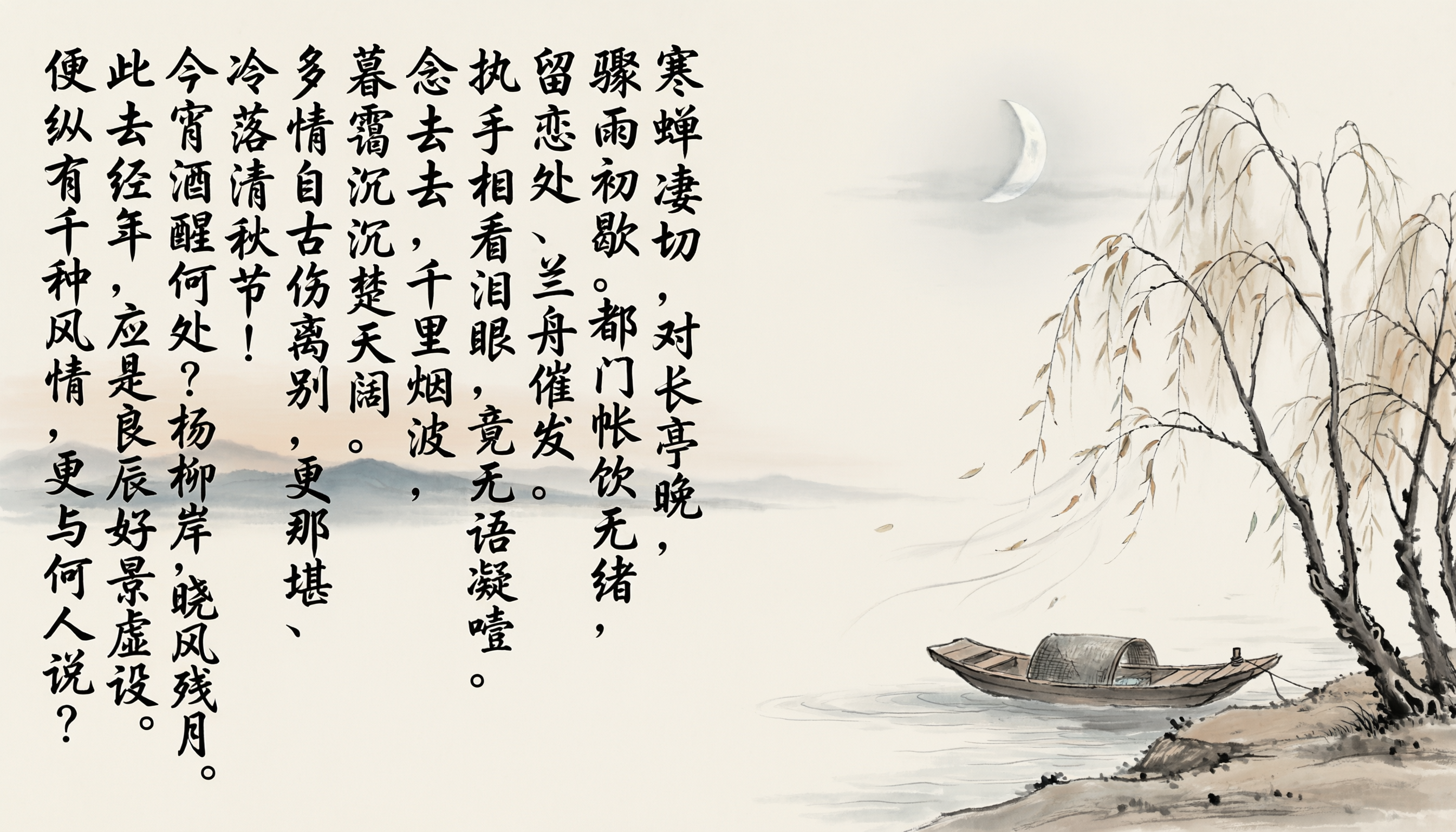
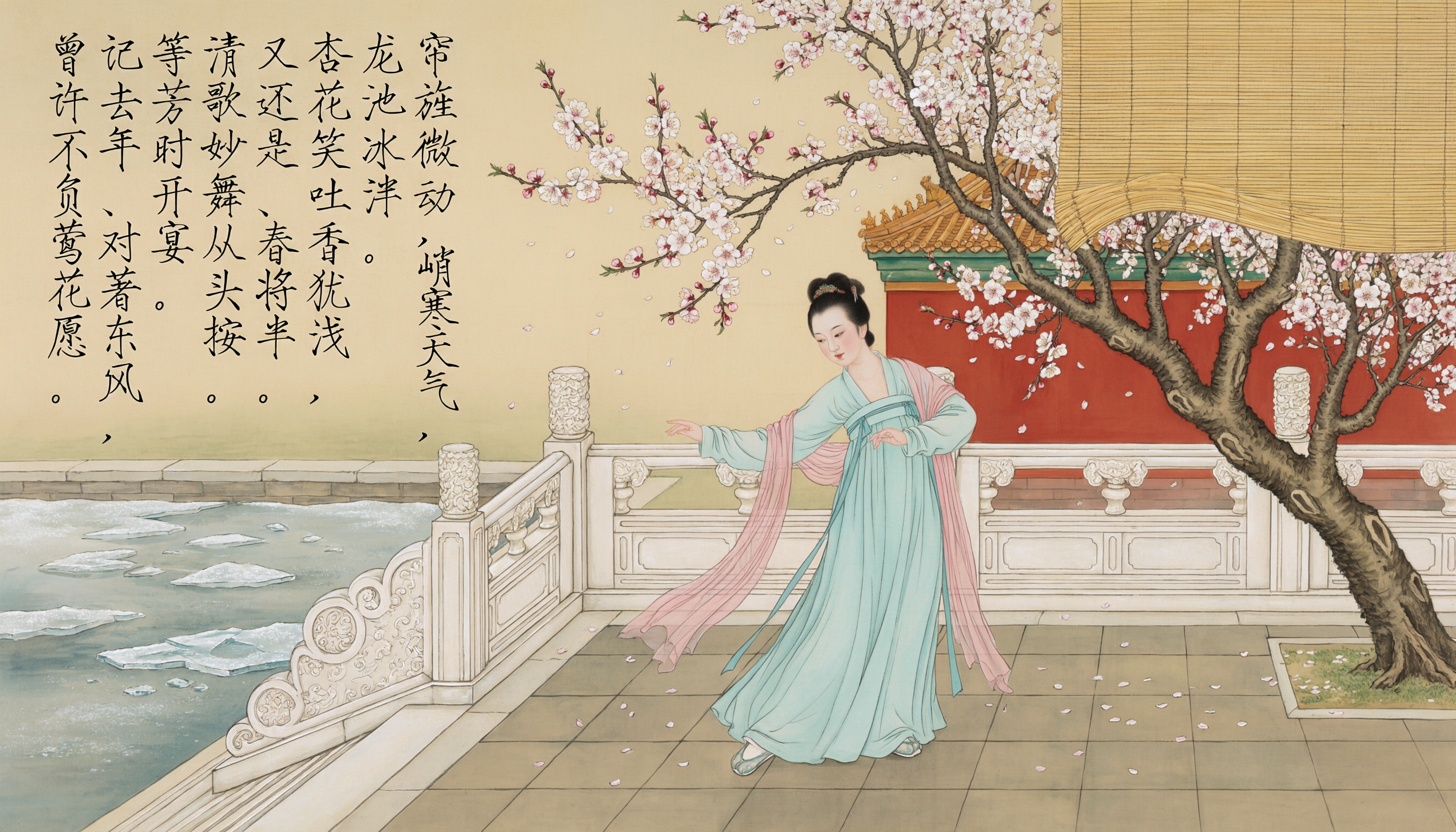
When generating mixed text-and-image compositions, the model tends to render text in blank areas to avoid obscuring the main visual subject. Additionally, the model supports multiple calligraphic styles—for instance, using Emperor Huizong of Song’s distinctive “Slender Gold” script to write his ci poem Tan Chun Ling:
一幅宋代宫廷风格工笔重彩画:画面中央为一位身着淡青色齐胸襦裙、披浅绯色薄纱披帛的偏瘦年轻宫女,立于雕花汉白玉栏杆旁的杏花树下翩然起舞,衣袖舒展如云,裙裾微扬,足尖轻点青砖地面,姿态柔婉而端庄;背景为春日皇家苑囿,枝头盛放粉白相间的重瓣杏花,花瓣随风轻落,树影婆娑;远处可见一角飞檐翘角的宫殿轮廓与半掩的朱红宫墙;左上角一泓清池初解冻,浮着细碎冰晶,画面右上方悬垂一道素雅湘竹帘,帘旌正被微风悄然吹动。整幅画采用绢本设色,色调清丽雅致。画面自上而下、自右向左以瘦金体工整题写全文:“帘旌微动,峭寒天气,\n龙池冰泮。\n杏花笑吐香犹浅,\n又还是、春将半。\n清歌妙舞从头按。\n等芳时开宴。\n记去年、对著东风,\n曾许不负莺花愿。” 字体纤劲挺拔,笔锋锐利如削,墨色乌亮。
Or, we can stress-test small regular script (xiaokai) using the Preface to the Poems Composed at the Orchid Pavilion:
一幅水墨设色长卷风格中国画。 画面中央偏右绘一位魏晋风度的文人雅士,身着宽袖素色交领袍服,头戴小冠,跽坐于兰亭水畔青石之上,左手轻抚膝前古琴,右侧远景为会稽山阴连绵青黛山峦,山间隐现曲径与飞檐亭角;近景溪水蜿蜒,留白处氤氲水气。画面自上而下、自右向左用王羲之小楷写着“永和九年,岁在癸丑,暮春之初,\n会于会稽山阴之兰亭,修禊事也。\n群贤毕至,少长咸集。\n此地有崇山峻岭,茂林修竹,\n又有清流激湍,映带左右,\n引以为流觞曲水,列坐其次。\n虽无丝竹管弦之盛,一觞一咏,\n亦足以畅叙幽情。是日也,\n天朗气清,惠风和畅。\n仰观宇宙之大,俯察品类之盛,\n所以游目骋怀,足以极视听之娱,\n信可乐也。夫人之相与,俯仰一世。\n或取诸怀抱,悟言一室之内;\n或因寄所托,放浪形骸之外。\n虽趣舍万殊,静躁不同,\n当其欣于所遇,暂得于己,\n快然自足,不知老之将至。\n及其所之既倦,情随事迁,感慨系之矣。\n向之所欣,俯仰之间,已为陈迹,\n犹不能不以之兴怀,况修短随化,\n终期于尽!古人云,死生亦大矣。\n岂不痛哉!每览昔人兴感之由,若合一契,\n未尝不临文嗟悼,不能喻之于怀。\n固知一死生为虚诞,齐彭殇为妄作。\n后之视今,亦犹今之视昔,悲夫!\n故列叙时人,录其所述,虽世殊事异,\n所以兴怀,其致一也。\n后之览者,亦将有感于斯文。”
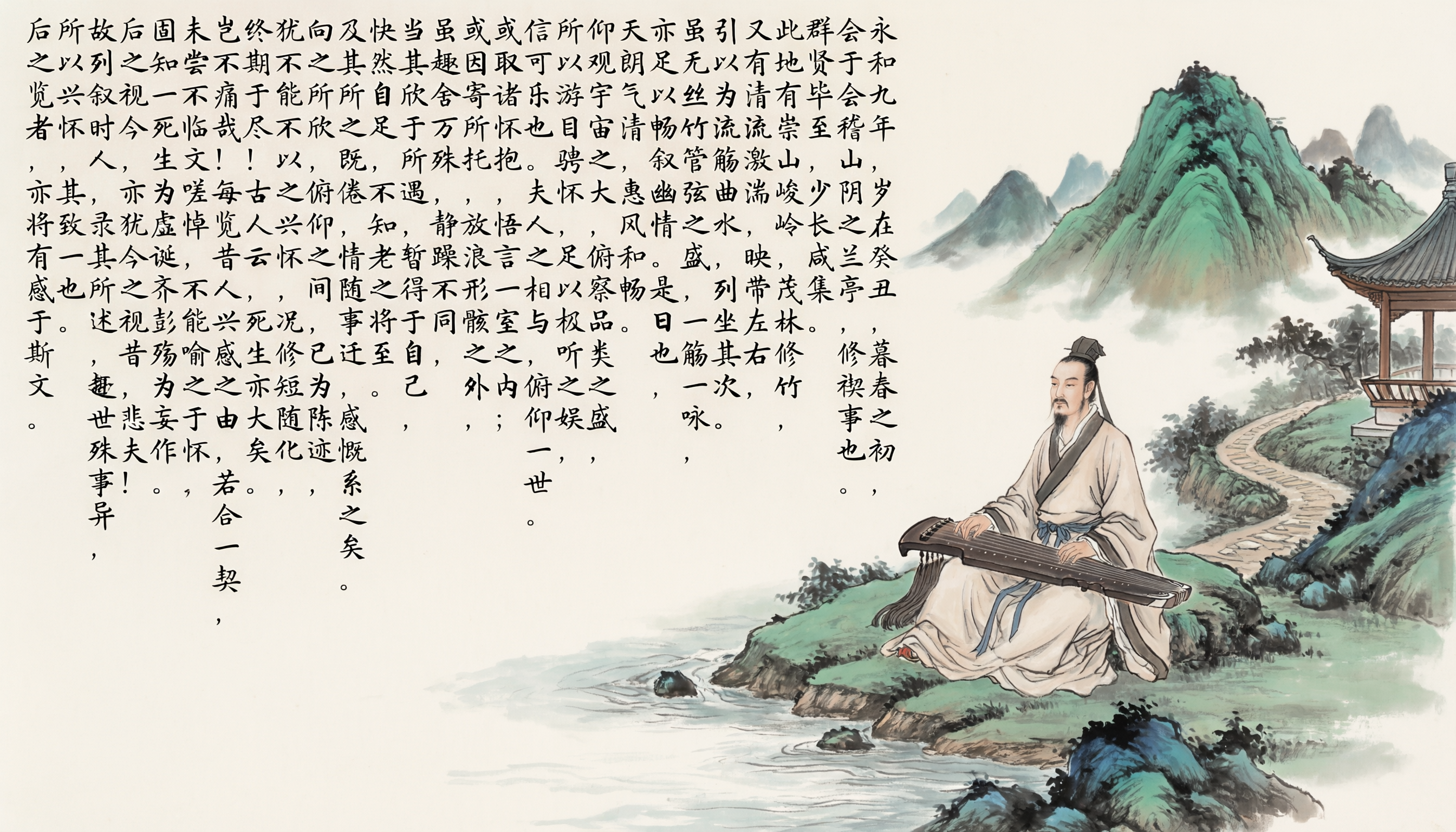
As shown, Qwen-Image-2.0 accurately renders nearly the entire Preface in small regular script, with only a handful of characters imperfect.
Beyond “precision,” “complexity,” “aesthetics,” and “alignment,” another characteristic of Qwen-Image-2.0’s text rendering is realism (“真”). Consider this prompt:
A wide-angle smartphone photograph of a modern glass whiteboard mounted on a wall inside a bright, airy office room with floor-to-ceiling windows overlooking the Great Wall of China winding across misty mountain ridges at golden hour — warm sunlight casts soft reflections and long shadows across the scene.\nCentered in the frame, a woman in her late 20s wearing a relaxed-fit white t-shirt prominently featuring a sleek “Qwen-Image” logo in gradient blue typography is writing on the board with a fine-tip magnetic stylus.\nHer handwriting is natural, slightly imperfect, and expressive — with visible pressure variation, subtle smudges, and organic line weight — conveying authentic human authorship.\nIn the lower-left corner of the glass surface, the photographer’s faint but unmistakable reflection appears: blurred outline of a person holding a phone at arm’s length, capturing the moment.\n\nOn the left side of the whiteboard, clean, legible handwritten text appears in dark gray marker with exceptional stroke fidelity:\n’Qwen-Image-2.0 Core Innovations:\n• Complex Typography Engine: 1K-token instruction support for professional PPTs, posters & infographics — pixel-perfect multi-script layout, sophisticated text-image composition, and complete rendering of large-volume textual content\n• Extreme Photorealism: Native 2K resolution (2048×2048) with microscopic detail on skin pores, fabric weave, architectural textures & natural foliage\n• Unified Omni Model: Generation + editing in one model — full-stack multimodal understanding and generation capabilities seamlessly integrated\n• 7B Efficiency: 2K image generation in seconds — optimal balance between visual fidelity and inference speed’\n\nOn the right side of the whiteboard, vertically aligned technical notes in crisp marker:\n’Why It Matters:\n→ One model delivers photorealistic imagery AND pixel-perfect text rendering simultaneously\n→ One model powers both text-to-image generation AND precise image editing without pipeline switching\n→ One model unifies deep multimodal understanding AND high-fidelity generation in a single 7B architecture’\n\nIn the bottom-right corner, a hand-drawn schematic in precise strokes:\n’[8B Qwen3-VL Encoder] → [7B Diffusion Decoder] → pixels (2048×2048)’\n— arrows flow with perspective depth, boxes feature soft shading, resolution specs annotated in fine print.\n\nThe glass surface exhibits realistic optical properties.\nBackground includes minimalist wooden shelving with design magazines open to full-bleed infographics — one prominently displays a crisp cover reading “Qwen 3.5” in bold modern typography — and a potted fiddle-leaf fig with individually rendered leaf veins partially visible out-of-focus.
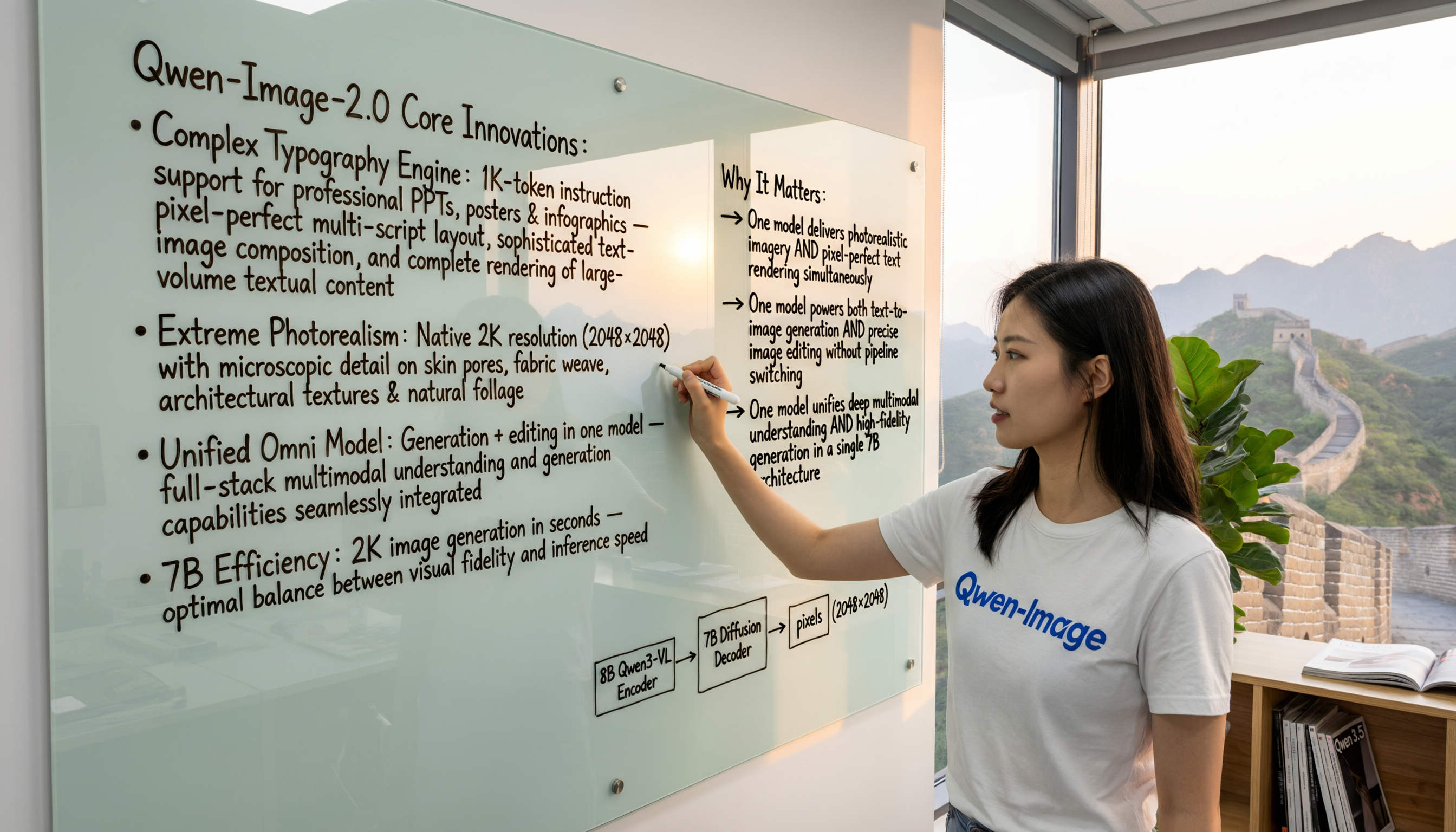
In this example, the model renders text across multiple media types: on glass whiteboards, clothing, and magazine covers. These surfaces differ in material properties and spatial orientation, yet Qwen-Image-2.0 accurately renders text on each while preserving realistic lighting, reflections, and perspective—greatly enhancing the authenticity of the generated image. This realism also shines when photorealistic imagery and text coexist, as in movie posters:
这是一张写实风格的"千灯问心"电影海报,画面以唐代长安城楼为背景,青灰色砖石城墙斑驳沧桑,城垛间飘着细雨,远处暗云低垂压着朱雀大街,整体色调偏冷灰蓝,突出历史厚重感与悬疑张力。画面中央五位主角呈对称布局:正中央是身着玄色锦袍的青年男子(约二十八岁),腰佩错金玉带,手持半卷书,眼神锐利如刀锋直视镜头;其左上方是束发执剑的少女(约十九岁),黑底暗纹劲装勾勒利落身姿,左手结印施法,发梢沾着雨珠;左下方是素衣女子(约二十六岁),手持一盏琉璃心灯,灯芯微光摇曳,指尖轻触灯罩纹路,神情凝重;右上方是虬髯将军(约三十五岁),玄甲覆着雨痕,左手按剑柄右手握虎符,下颌紧绷显威严;右下方是绛紫襦裙的成熟女子(约三十一岁),发髻簪银螭簪,手持竹简垂目沉思,衣褶处雨水滴落痕迹清晰可见。五人站位精准——中央人物略前倾,左右人物呈阶梯式错落,面部光影采用电影级侧逆光处理,突出丝绸反光、皮革纹理与金属冷感,背景虚化保留城墙雨痕与远处灯笼微光,既写实又不喧宾夺主。 文字元素密集而考究:顶部"「星河视频 独家出品」“与”「幻影文化」“等出品方LOGO以烫金浮雕字体嵌入城楼飞檐;中央主标题”「千灯问心」“采用立体阴刻工艺,字面覆仿古铜锈与细微裂纹,边缘透出内敛金光;标题下方”「3月15日 长安夜 真相现」“以烫银楷体呈现于半透明绢布;左侧垂直排列”「监制:陈某」“与”「领衔主演:周某 饰 沈知微 张某 饰 寂元 陈某 饰 张玄 俞某 饰 苏仪 胡某 饰 王明远」";底部制作信息以极简衬线字体密集标注"「出品:玄光影业 星穹传媒」"、"「联合出品:幻影文化 云梦工作室 星河娱乐 梦境影视 无界影业 灵寒制作 虚空映画 琉璃影业 天启映画 光影未来」"、"「视觉指导:赵某」"、"「美术设计:屠某」"、"「发行:星耀影业」"、"「独家网络平台:星河视频」"、"「全球发行:寰宇影联」"、"「特效制作:幻境视界」"、"「音乐制作:天籁音坊」“及”「星河影视 全球同步上映」",所有文字均与画面材质光影自然融合,无浮夸特效,彰显电影工业级制作的沉稳高级感。
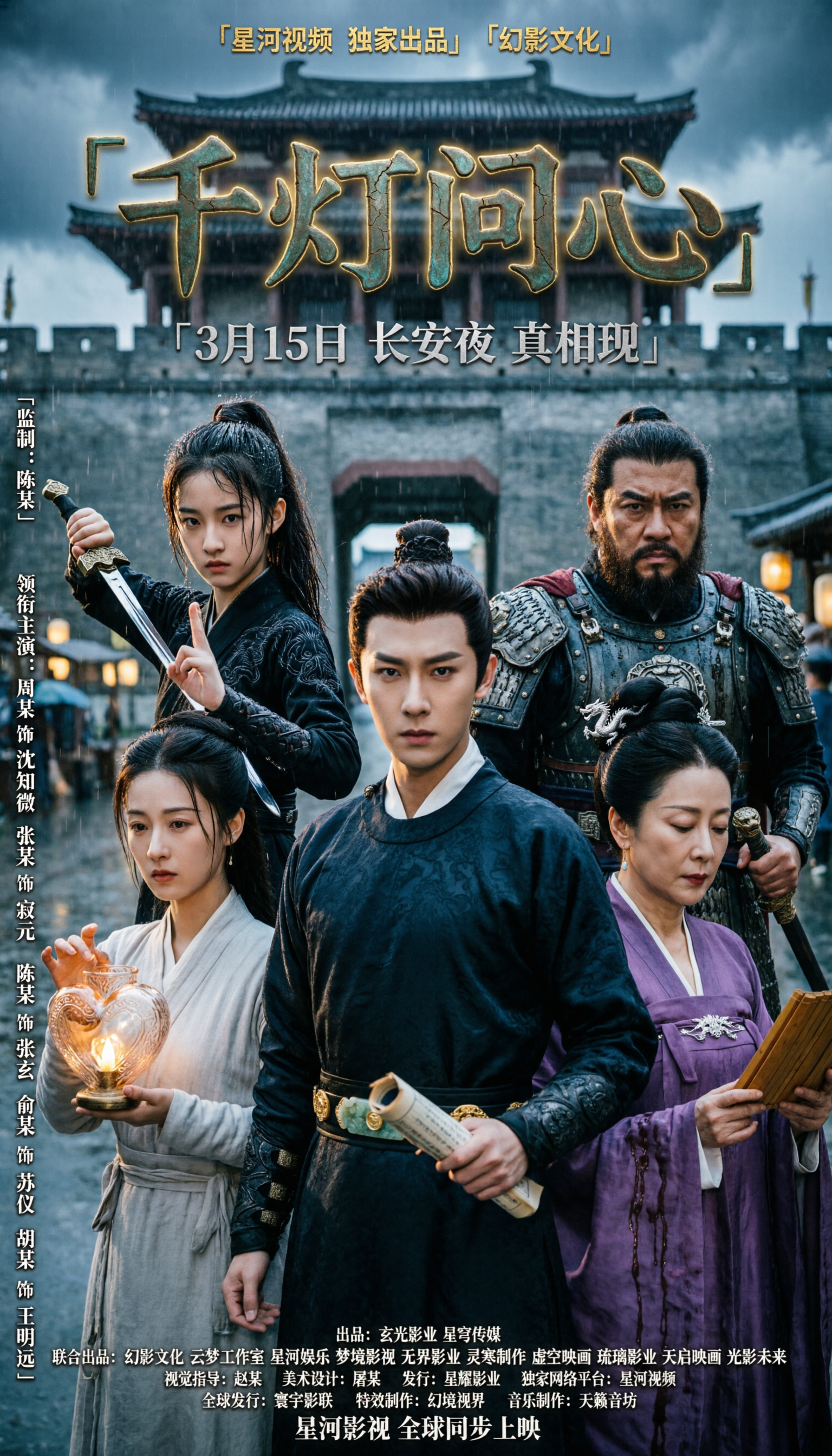
Beyond “precision,” “complexity,” “aesthetics,” and “realism,” Qwen-Image-2.0 also excels at alignment and organization (“齐”). Consider this example:
Chinese ink painting calendar for February 2026, vertical composition on crimson silk texture with gold foil accents, festive vermilion and gold palette: TOP SECTION: Bold vermilion calligraphy “二月” centered at top with subtle gold leaf shimmer. MIDDLE SECTION: Glowing red lanterns floating above ancient courtyard at night, family reunion scene with steaming dumplings on wooden table, distant fireworks illuminating indigo sky with snowflakes, plum blossoms framing composition, traditional paper-cut window decorations visible through lattice windows. BOTTOM SECTION: Clean 7-column calendar grid with 6 rows, subtle grid lines in pale gold, each cell containing Chinese text as follows: Row 1 (weekdays header in pale grey): “日” “一” “二” “三” “四” “五” “六” Row 2: - Sunday cell: “腊月十四 1日” - Monday cell: “腊月十五 2日” - Tuesday cell: “腊月十六 3日” - Wednesday cell: “腊月十七 4日” - Thursday cell: “腊月十八 5日” - Friday cell: “腊月十九 6日” - Saturday cell: “腊月二十 7日” Row 3: - Sunday cell: “腊月廿一 8日” - Monday cell: “腊月廿二 9日” - Tuesday cell: “腊月廿三 10日” - Wednesday cell: “腊月廿四 11日” - Thursday cell: “腊月廿五 12日” - Friday cell: “腊月廿六 13日” - Saturday cell: “腊月廿七 14日” with light purple background rectangle underneath text labeled “春节调休(班)” Row 4: - Sunday cell: “腊月廿八 15日” with light purple background rectangle underneath text labeled “春节(休)” - Monday cell: “腊月廿九 16日” with light purple background rectangle underneath text labeled “除夕” - Tuesday cell: “正月初一 17日” with light purple background rectangle underneath text labeled “春节(休)” and red circle surrounding the number “17” - Wednesday cell: “正月初二 18日” with light purple background rectangle underneath text labeled “雨水” and light purple background rectangle underneath text labeled “春节(休)” - Thursday cell: “正月初三 19日” with light purple background rectangle underneath text labeled “春节(休)” - Friday cell: “正月初四 20日” with light purple background rectangle underneath text labeled “春节(休)” - Saturday cell: “正月初五 21日” with light purple background rectangle underneath text labeled “春节(休)” Row 5: - Sunday cell: “正月初六 22日” with light purple background rectangle underneath text labeled “春节(休)” - Monday cell: “正月初七 23日” with light purple background rectangle underneath text labeled “春节(休)” - Tuesday cell: “正月初八 24日” - Wednesday cell: “正月初九 25日” - Thursday cell: “正月初十 26日” - Friday cell: “正月十一 27日” - Saturday cell: “正月十二 28日” with light purple background rectangle underneath text labeled “春节调休(班)” Row 6: (empty row for visual balance, subtle decorative pattern of gold coins and ingots) Minimalist negative space with auspicious cloud motifs in corners, traditional woodblock print aesthetic with gold foil accents, all text in elegant Song typeface with vermilion red for dates and deep black for lunar dates, subtle rice paper texture overlay
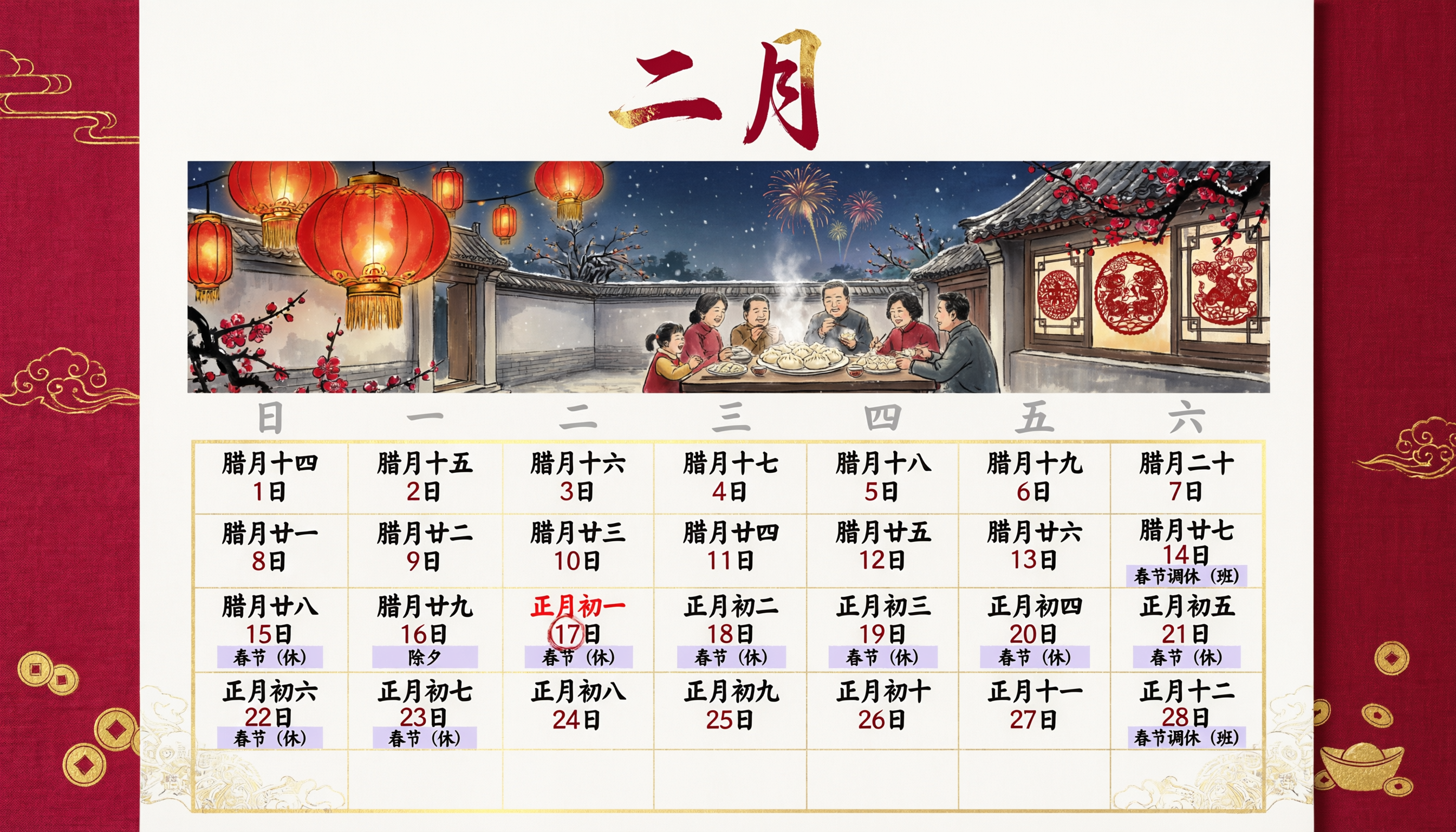
In this example, all text elements are precisely aligned within the calendar grid. This alignment capability also applies to comic panels—for instance:
一个4x6格漫画,一共4行,每行6格。每一格之间有白色的分割线。 第一排,从左到右依次为 第一格:一个凌乱的实验室中。戴眼镜、穿油污工装背带裤的男孩(小智)专注焊接发光的绿色球体。墙上贴满草图和公式。对话框显示“终于完成了!生态球”。 可爱机器人用机械臂递上咖啡,头顶显示器是笑脸。“主人,休息一下吧。明天就是大赛了” 第二格:戴眼镜、穿油污工装背带裤的男孩看向窗外,城市笼罩在灰色雾霾中。“是啊,这座城市需要它” 第三格:绿色小球的特写镜头,内部微小植物生长,发出柔和绿光。在远处,实验室角落监控的摄像头红灯闪烁。 第四格:一个冰冷的高科技实验室中。穿黑西装的面具男站在屏幕前,屏幕画面是一个机器人给戴眼镜、穿油污工装背带裤的男孩递咖啡。“哼,就凭那个小子也想赢我?我的‘净界者’才是未来!” 第五格:黑色的双手伸向工作台上发光的绿色球体。警报器红光闪烁。对话框内容:“警告!检测到非法入侵!” 第六格:戴眼镜、穿油污工装背带裤的男孩冲进实验室,实验室的支架空荡荡,一片狼藉。机器人在一旁,屏幕是担忧哭脸。男孩说:“不!我的生态球!完了…一切都完了…” 第二排,从左到右依次为 第一格:机器人拍拍戴眼镜、穿油污工装背带裤的男孩肩膀,屏幕切换成坚定表情“主人,不要放弃。我们还有时间!”。戴眼镜、穿油污工装背带裤的男孩眼中重新燃起斗志,紧握拳头。“对!我们得把它找回来!” 第二格:男孩在电脑前分析监控录像,定格在黑影翻墙瞬间。“这个背影…太熟悉了…阿凯!” 第三格:穿黑西装的面具男在高科技实验室内把玩绿色小球。 第四格:一个男孩和一个机器人躲在草丛后,拿着望远镜,对着远处灯火通明的实验室看。男孩说:“果然是他!硬抢不行,我们得智取。” 第五格:一个外卖机器人站在门前,提着餐盒:“启动伪装。目标:顶层实验室”。 第六格:一个实验室桌子上有一个打开的餐盒,里面是一个磁铁,文字气泡内容:“强磁力干扰器”。 第三排,从左到右依次为 第一格:实验室灯光闪着火花,电脑屏幕故障。穿着黑西装的面具男在修理电脑,说着:“怎么回事!”。 第二格:穿着黑西装的面具男回头,只看到开着的门。“该死!上当了!” 第三格:机器人与戴眼镜、穿油污工装背带裤的男孩汇合,两人击掌。“成功!” 第四格:回到实验室,戴眼镜、穿油污工装背带裤的男孩在工作台上修理小球。多条机械臂高速工作,出现残影。“计算中…校准中…” 第五格:桌上的小球发出红光并冒烟,戴眼镜、穿油污工装背带裤的男孩额头冒汗,说着:“不好!被他动过手脚!”。旁边有一个机器人:“别慌,我在重写代码” 第六格:舞台上有一个横幅上面写着“未来之城发明大赛”,戴眼镜、穿油污工装背带裤的男孩抱着发光的绿色小球站在舞台上,文字气泡“最后一位选手,小智和他的生态球!”。穿黑色西装的面具男在台下:“等着出丑吧。” 第四排,从左到右依次为 第一格:绿色小球释放绿色能量波纹。舞台下面有许多观众:“哇!好神奇!这技术非常有前景。” 第二格:小球突然变成红色,卷起龙卷风。穿黑色西装的面具男藏在后台,手中握着遥控器,上面有一个红色按钮。 第三格:机器人被卷入龙卷风中,对话框:“主人,快切断电源!”。 第四格:穿着制服的警察把黑西服面具男按在地上,文字气泡内容:“你被逮捕了!” 第五格:男孩抱着受损的机器人,“对不起,小铁,都是我的错”。机器人屏幕亮起虚弱笑脸:“主人…别难过…我很高兴…能帮上忙…” 第六格:男孩和机器人肩并肩站在窗边,望着晴朗干净的城市。小铁屏幕上是一个大大的爱心。右下角写着:“最好的发明,永远是爱与信任。”
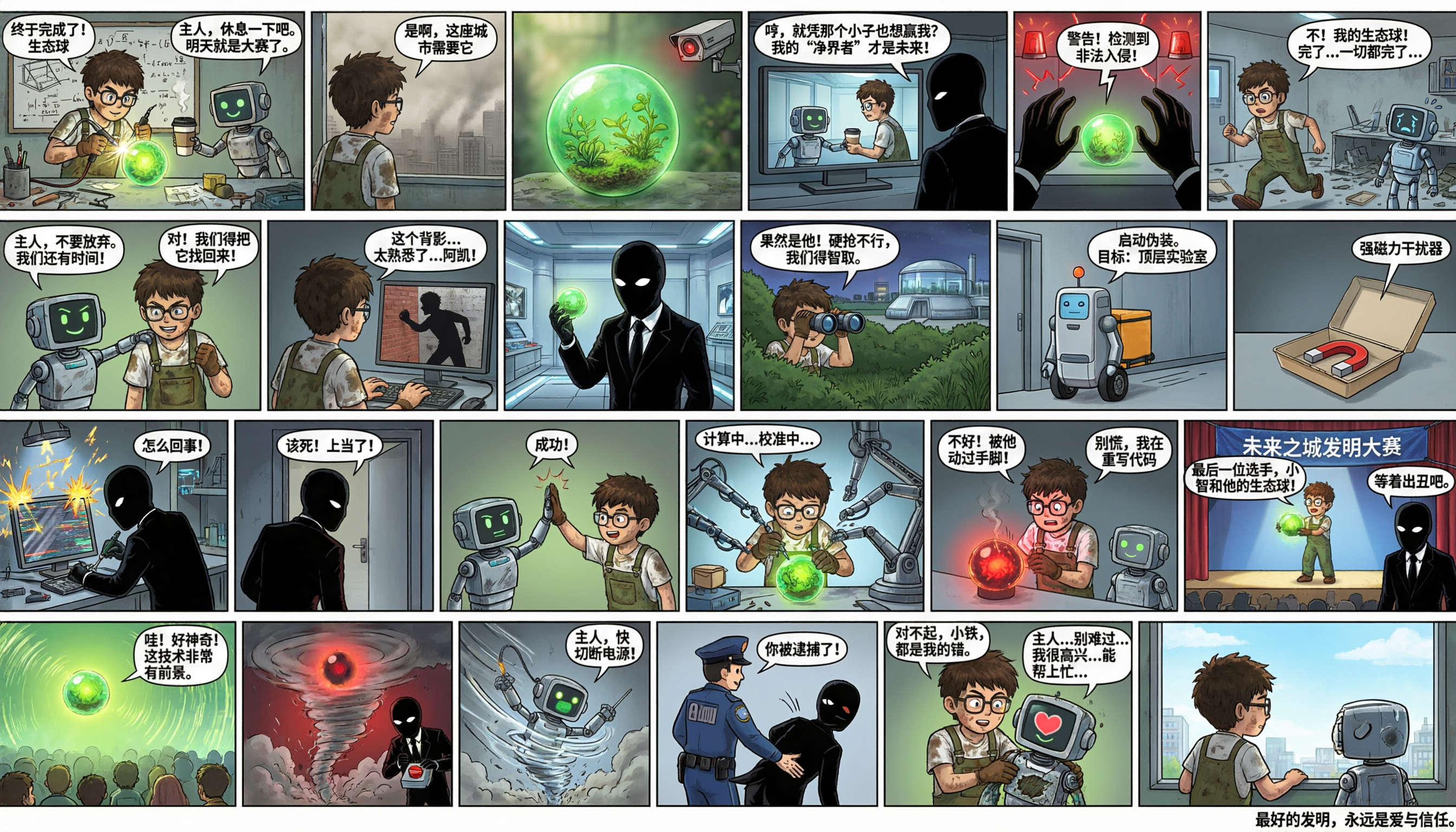
Within each comic panel, dialogue text is neatly arranged and centered inside speech bubbles, creating a natural and professional appearance. Similarly, in the OKR infographic below, similar text blocks are automatically aligned:
图像中央偏左位置有大号加粗黑体字“OKR工作法”,其正下方为稍小字号的“提升团队效率”。从该中心文字向四周辐射出四条带箭头的连线,分别指向四个模块:右上为“实施流程”,右中为“提效机制”,右下为“常见挑战”,左下为“关键原则”。 在左上角,有一个红框矩形,内含标题“Objective (O)”,下方三行小字为:“激励性强|清晰可感|”、“回答‘我们想实现什么’”。该红框右侧有一条带方括号标注“[驱动]”的黑色箭头,指向右侧的“核心结构”字样。 紧邻其下方是一个蓝框矩形,标题为“Key Results (KR)”,下方三行小字为:“2-5个|可测量|”、“有时限|有挑战性|”、“回答‘如何证明实现了目标’”。该蓝框右侧有一条带方括号标注“[衡量]”的黑色箭头,也指向“核心结构”。 “核心结构”三个字位于中心文字正上方,字体加粗,下方有一条红色向下箭头指向“OKR工作法”。“实施流程”模块位于右上区域,包含三个横向排列的矩形框,由左至右依次为:- 第一个红框矩形,标题“设定对齐目标”,下方小字“Vertical & Horizontal Alignment”;- 第二个蓝框矩形,标题“周期性执行与追踪”,下方小字“周会|仪表盘|透明化”;- 第三个灰框矩形,标题“回顾与复盘(Retrospective)”,下方小字“学习>考核|持续优化”;三者之间以黑色实线箭头连接,方向从左至右。“提效机制”模块位于右侧中部,包含三个椭圆形框,从左到右排布,并由虚线连接:- 左侧椭圆:标题“聚焦优先事项:”,下方“1-3个O|做对的事,而非做完所有事”;- 中间椭圆:标题“增强透明与协作:”,下方“全员OKR公开|打破部门壁垒”;- 右侧椭圆:标题“激发自主性与责任感:”,下方“参与式制定|成就感驱动内在动机”。“常见挑战”模块位于右下区域,包含两个并列的红框矩形:- 上方红框内文字为“目标设定失衡”,其下两行小字:“KR全0.3 或 全1.0 → 采用0.7理想分割”;在右侧,有红色叉号及文字“× 严禁绑定薪酬”。下方红框内文字为“OKR ≠ 绩效考核”。 关键原则”模块位于左下区域,列有四条带颜色圆点的条目:- 红色实心圆点后接“方向性 × 结果导向”;- 蓝色实心圆点后接“挑战性 × 可行性”;- 黑色实心圆点后接“透明性 × 自主性”;- 绿色实心圆点后接“周期性 × 学习性”。图像右下角绘有一个简笔画小人,戴眼镜,右手持一支红白相间的马克笔,小人头部右侧有一个对话气泡,内部文字为“区分KPI(评价奖惩)与OKR(发展对齐)”
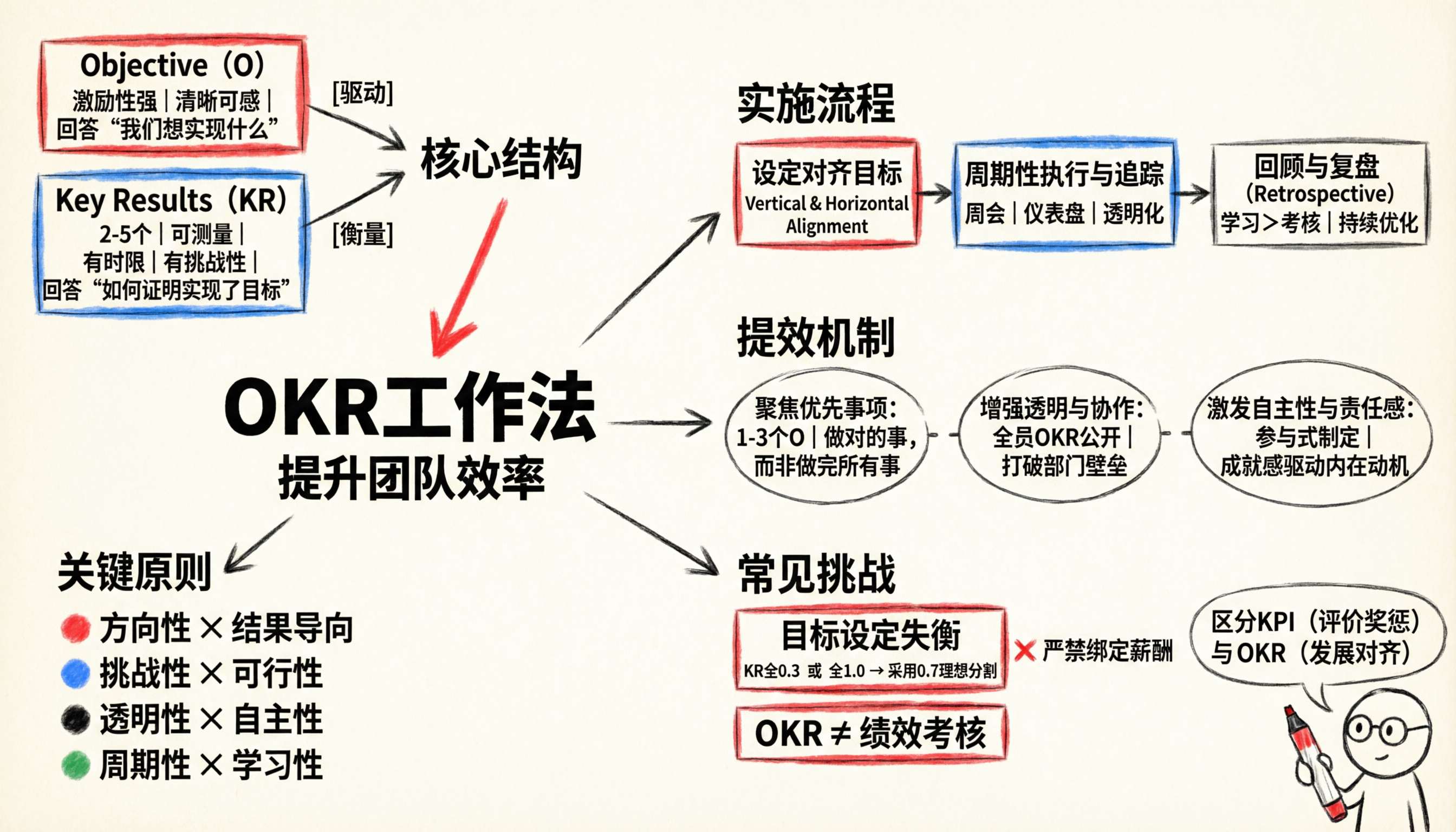
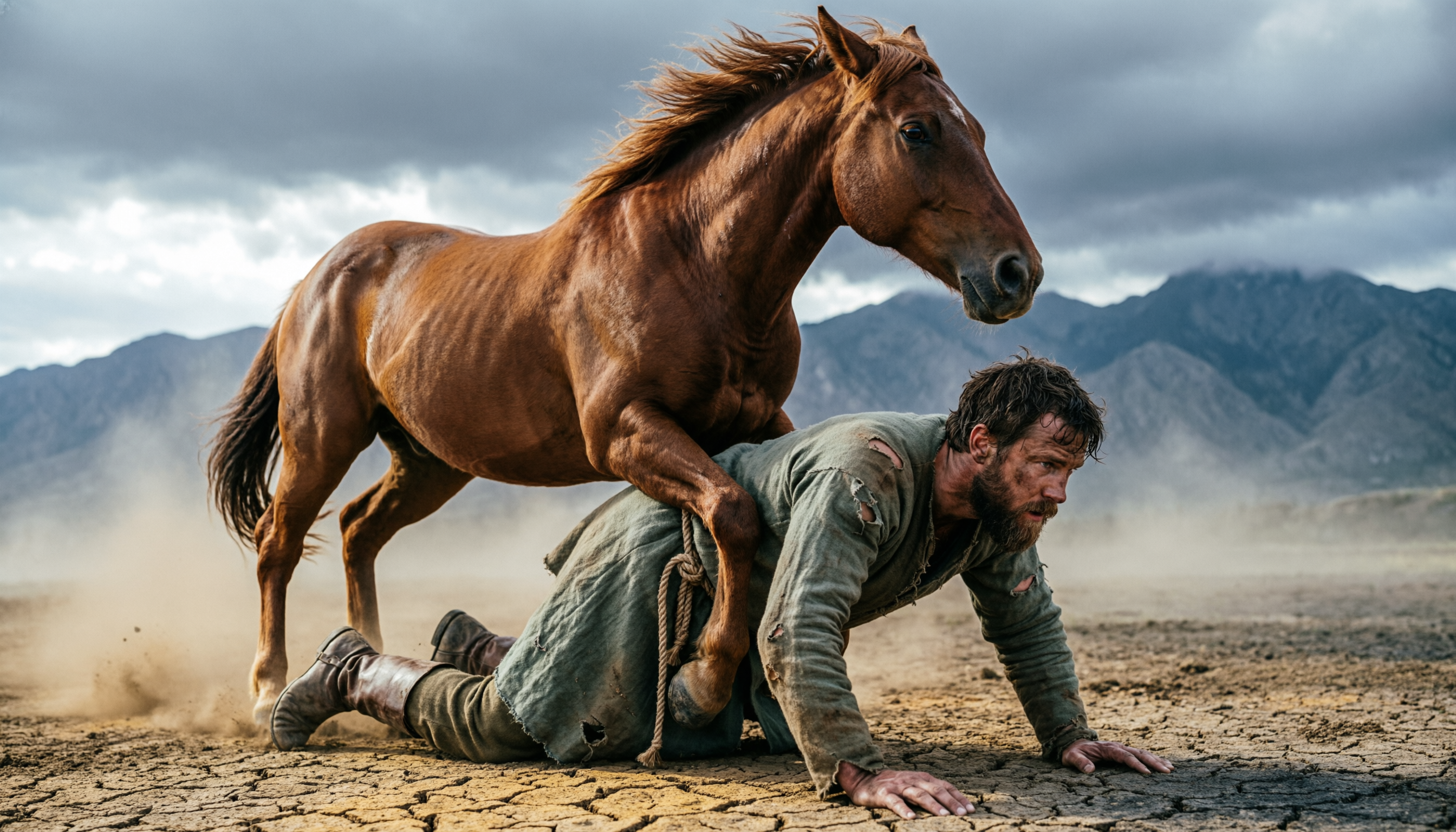
To recap, we’ve introduced five key characteristics of Qwen-Image-2.0’s text rendering capabilities: precision (“准”), complexity (“多”), aesthetics (“美”), realism (“真”), and alignment (“齐”). Beyond text rendering, Qwen-Image-2.0 also delivers significantly improved photorealism in non-text scenarios. For example, in this “horse riding a human” prompt:
一片荒凉的草原延伸至远方,地面干燥龟裂,细碎尘土正因剧烈动作而扬起,在低空形成微茫的灰褐色薄雾。中景平视构图:一匹肌肉虬结、体格雄健的成年棕色马昂首跨立,前蹄重重压在一名俯卧男子的背部肩胛与脊柱之间,后腿绷紧蓄力,颈部高扬,鬃毛逆风飞扬,鼻孔张大,眼神锐利专注,充满原始压迫感。 \n被压制的男子为白人男性,30–40岁,面部沾满尘土与汗渍,深褐色凌乱短发贴于额角,浓密胡须微湿;身着磨损严重的灰绿色中世纪风格长袍,布面可见多处撕裂与泥污,腰间系粗麻绳,脚蹬刮痕累累的及踝皮靴;身体呈强撑的俯卧撑姿态——双掌用力抵住龟裂干土,指节泛白,手臂青筋凸起,双腿向后伸直绷紧,脚趾抠入地缝,整个躯干因承重而微微震颤。 \n背景是连绵起伏的灰蓝色山脉,轮廓冷峻,山顶隐没于低垂的铅灰色多云天幕之下,云层厚实却透出漫射柔光,光线自左前方45度自然倾泻,在马腹下、男子手背与龟裂地表投下清晰而富有体积感的阴影。整体色调严格控制在大地色系内:马毛呈暖棕褐,长袍为灰绿褐渐变,土壤是赭石、干土黄与炭灰交织,尘雾为浅褐灰,天空为哑光铅灰与云底微光的冷灰过渡。画面为写实主义高清摄影质感,纹理极度精细——可见马颈汗珠、袍子经纬线磨损、皮肤毛孔与胡茬、龟裂泥土的棱角与浮尘颗粒,氛围紧张、原始、充满生物性力量对抗的窒息张力。
Qwen-Image-2.0 not only accurately models the “riding” action but also meticulously renders the horse’s musculature and hair, the man’s facial expression, and the cracked earth texture. Another example:
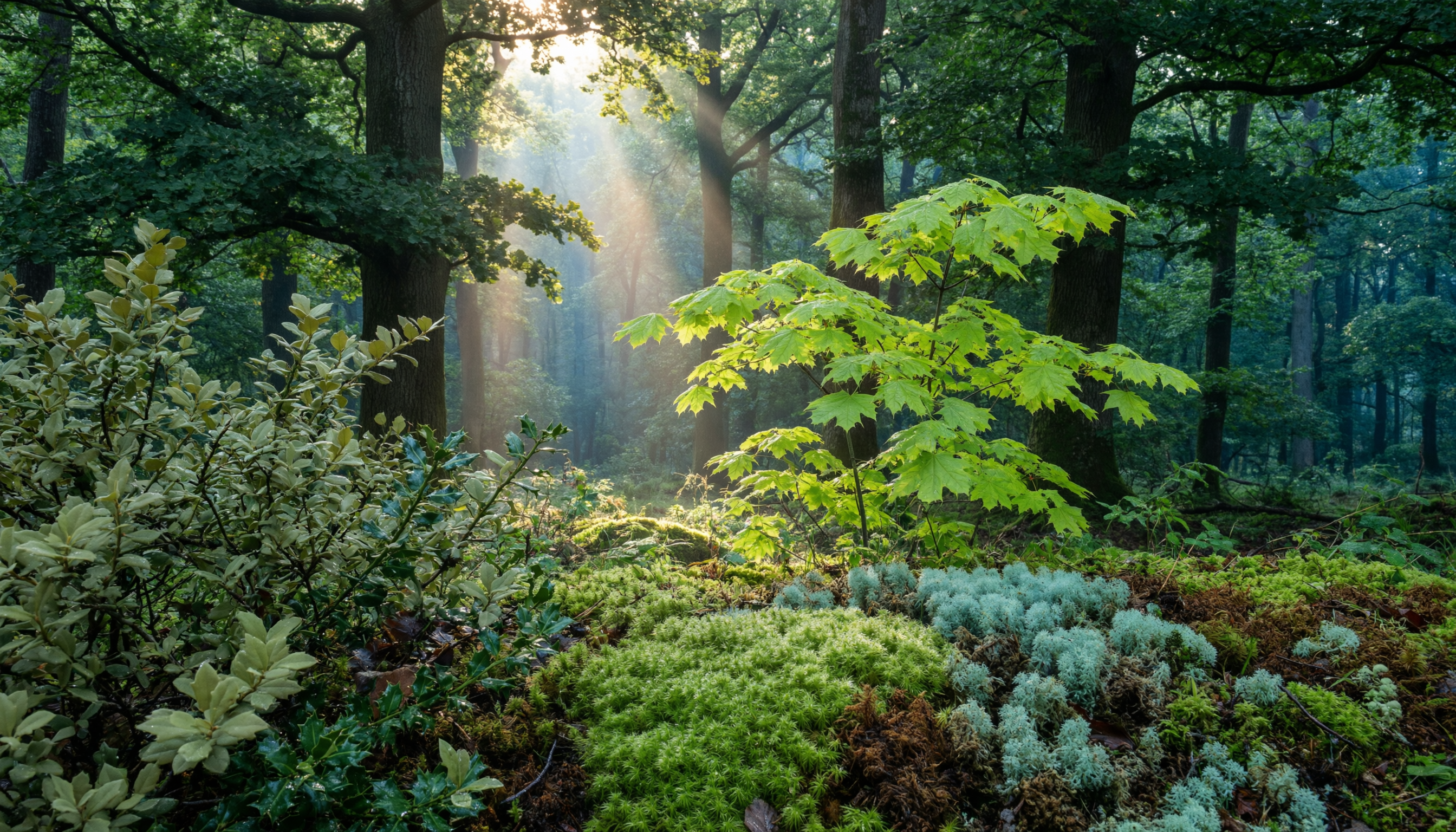
一幅写实风格的夏日森林场景,画面中央是一片幽深静谧的林间空地,高大挺拔的橡树与山毛榉构成主体乔木层,其浓密树冠呈现深邃厚重的墨绿色,叶片表面带有细微的蜡质反光;树冠间隙中透下柔和而强烈的阳光,在空气中形成清晰可见的丁达尔光束,光束边缘略带暖金色调,与冷调绿影形成微妙对比。中景处一丛新生的枫树嫩枝舒展着鲜亮明快的翠绿色叶片,叶脉清晰、半透明感强,边缘微微卷曲,仿佛刚经历晨露洗礼。前景左侧低矮的冬青与荚蒾灌木丛披覆着哑光柔和的橄榄绿色,枝叶交错,纹理细腻,部分叶片背面泛出浅灰绿光泽。地面覆盖着厚实湿润的苔藓层,由多种苔类组成:近处是绒状垂穗藓,呈现饱满润泽的青绿色,表面凝结细小露珠;稍远处为鳞叶藓与泥炭藓交织,显出微带蓝调的灰青绿与棕绿过渡;腐叶层隐约可见,呈深褐与墨绿混融的有机质感。所有植被表面均带有自然微湿反光,空气中有极细微的悬浮微粒在光束中浮动。背景林区渐次虚化,保留层次但不抢主体,远景融入一层薄薄的蓝绿雾霭。整体光影为上午10点左右的斜射日光,明暗对比适中,绿色系通过23种以上不同明度、饱和度、冷暖倾向与材质表现(如蜡质、绒面、革质、胶质)精确区分,毫无重复感,营造出丰饶、呼吸感强烈、充满生物细节与生态真实性的夏日森林秘境。
Qwen-Image-2.0 models over 23 distinct shades of green, with natural details rendered in exquisite fidelity. Civitai Mod Note: extremely sus image 👀
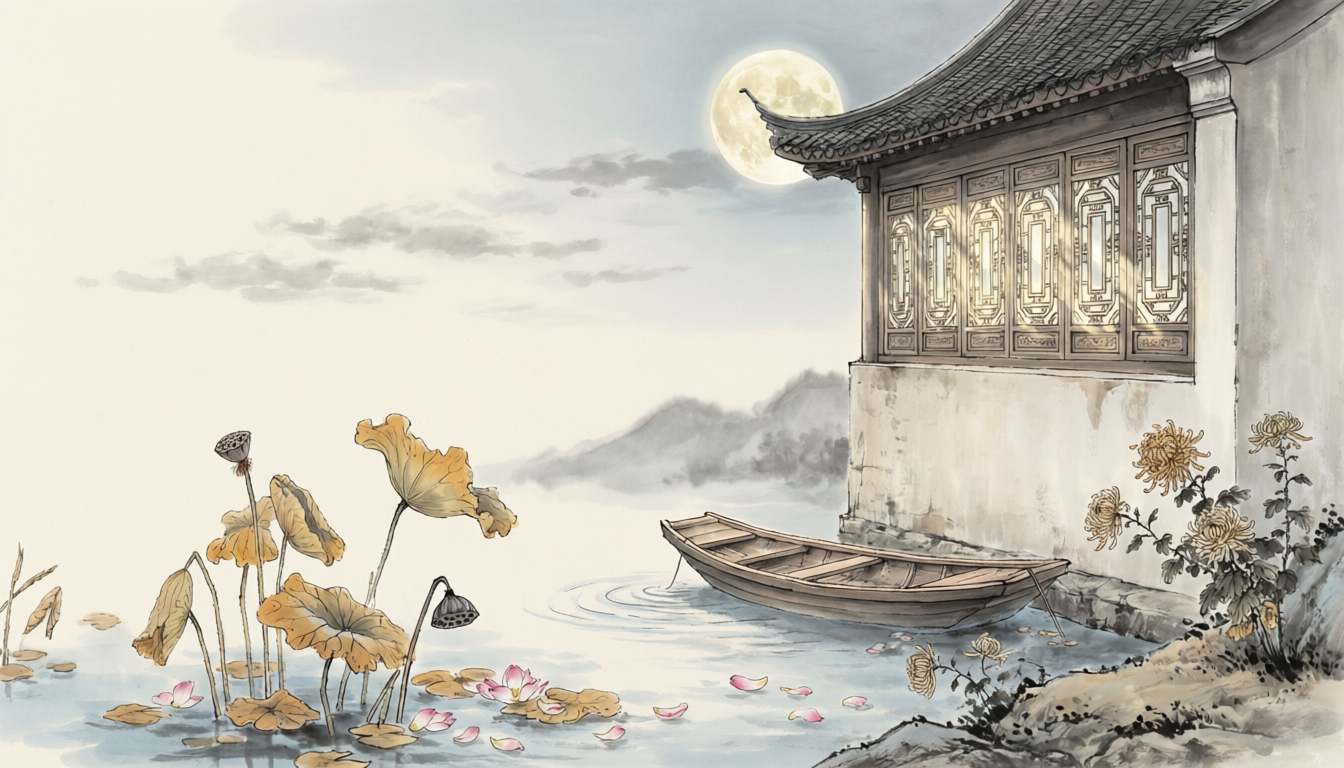
Beyond text-to-image generation, Qwen-Image-2.0 also delivers enhanced image editing capabilities. Excitingly, because this is a unified generation-and-editing (omni) model, improvements in text rendering and photorealism from the generation side directly benefit editing tasks across the board. For instance, thanks to enhanced text rendering, the model can directly inscribe poetry onto an existing image:
在图片的左上角加上从右到左,从上到下写着的赵孟頫楷书“红藕香残玉簟秋。轻解罗裳,独上兰舟。云中谁寄锦书来?雁字回时,月满西楼。花自飘零水自流。一种相思,两处闲愁。此情无计可消除,才下眉头,却上心头。”
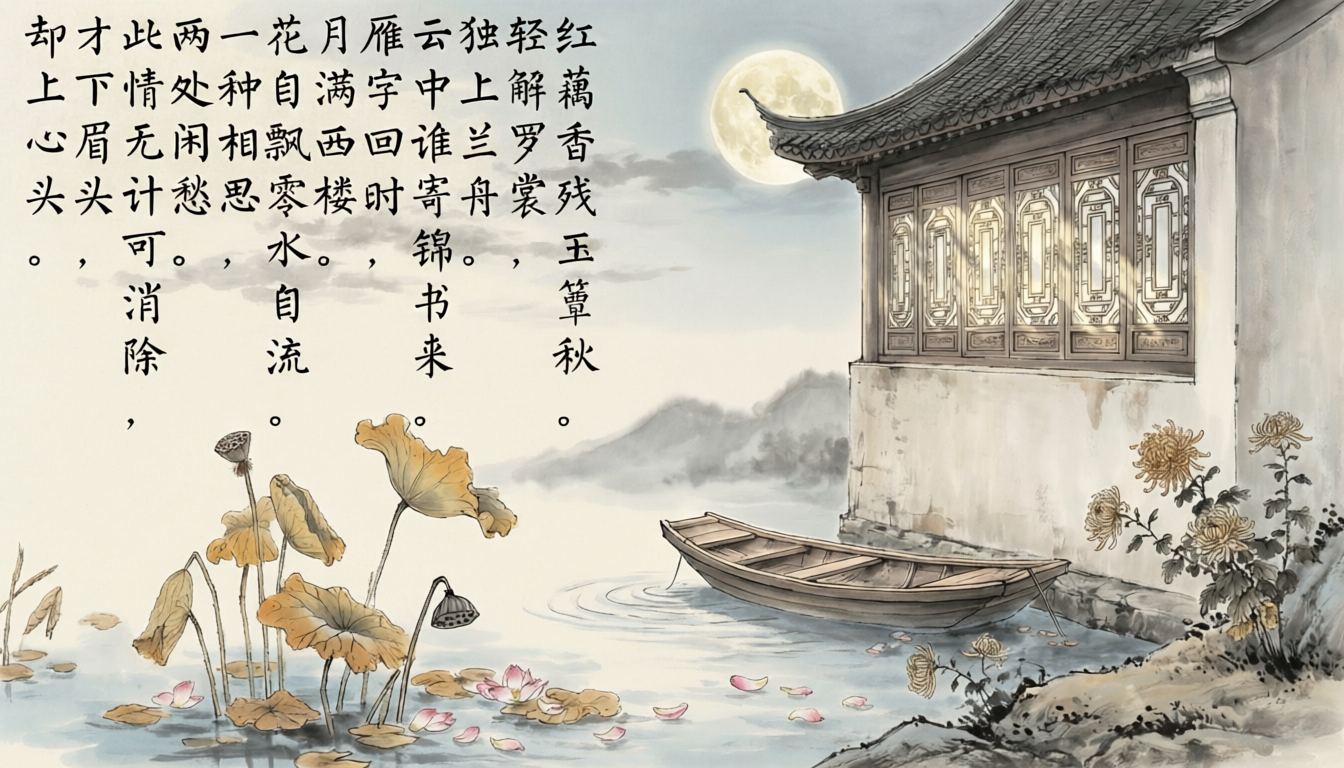
This enhancement enables many interesting applications—for example, uploading any photo and having the model inscribe a poem onto it:
帮我在画面上加一首诗
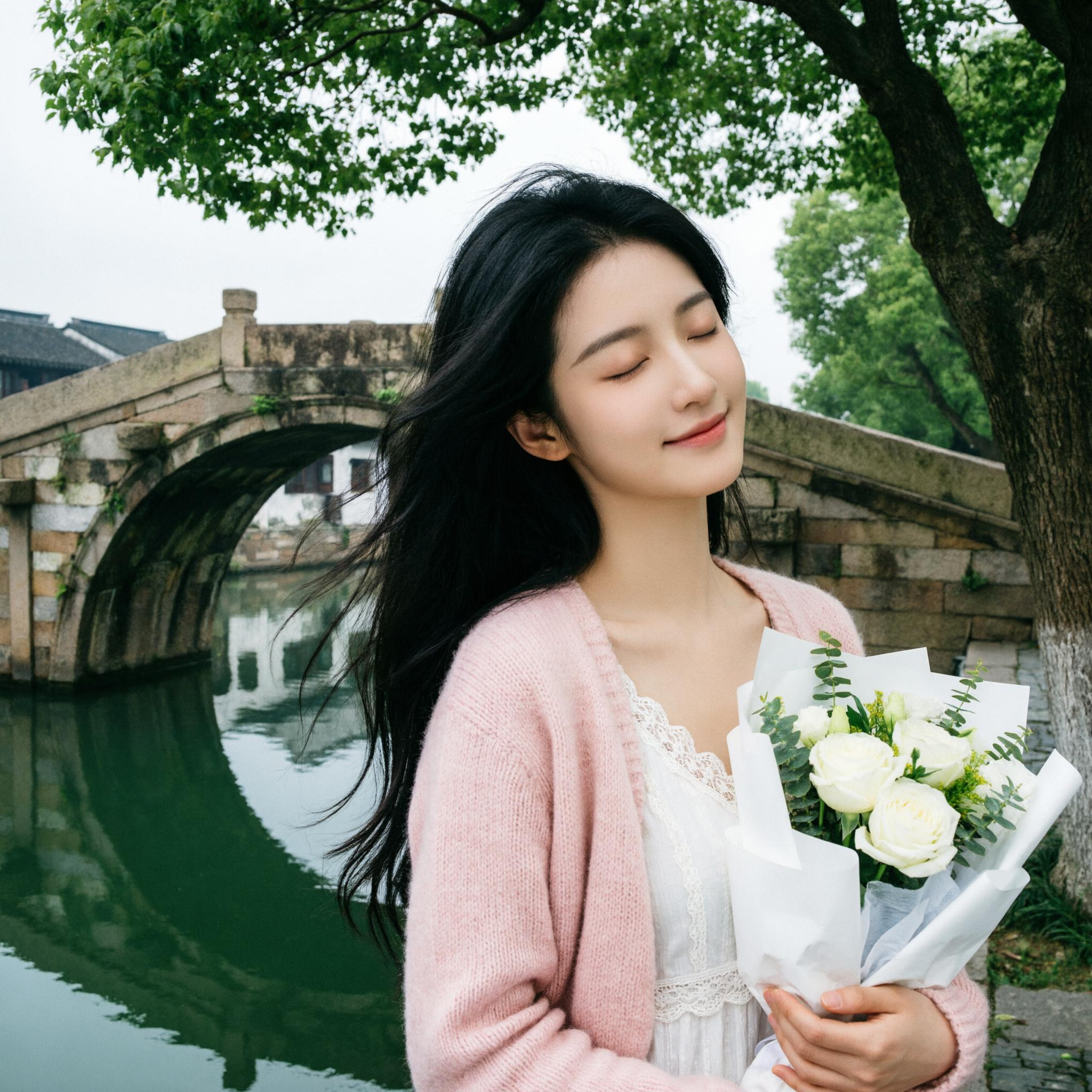
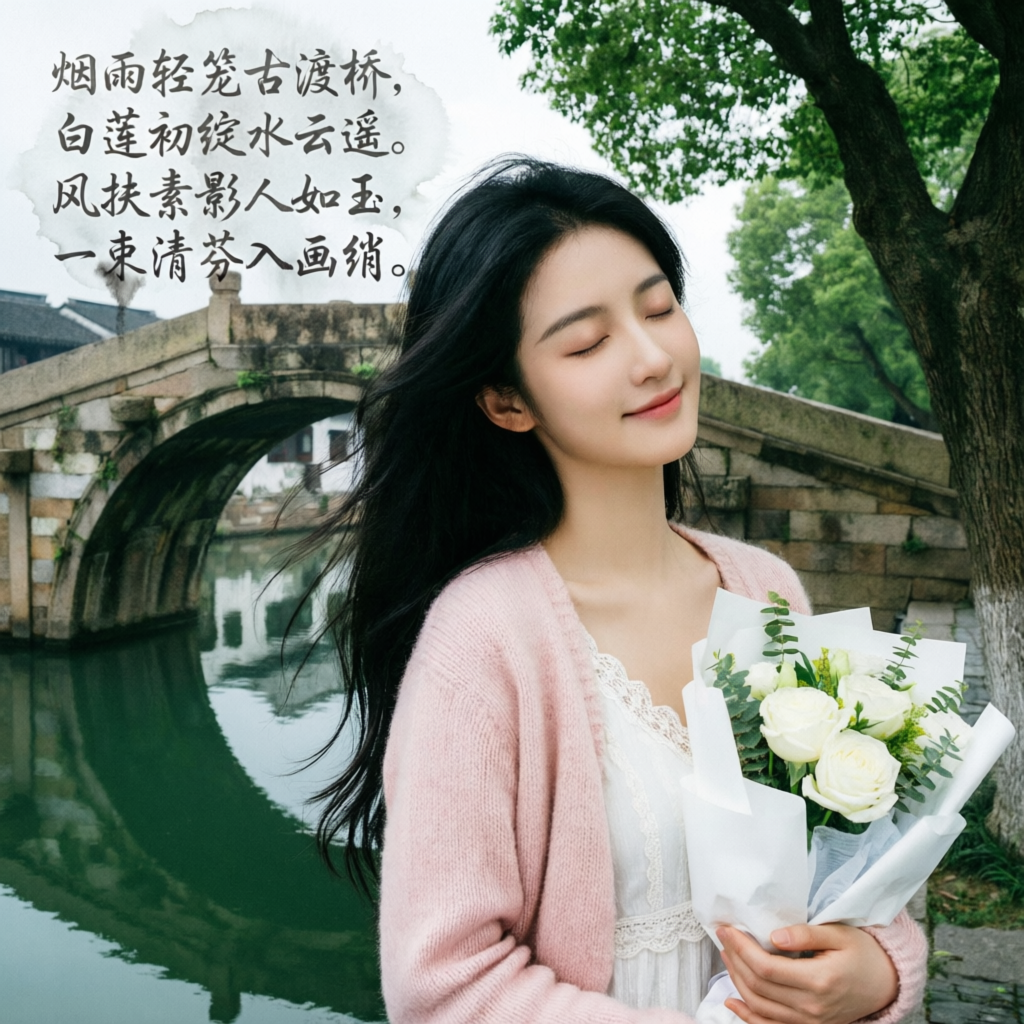
Beyond text, editing photorealism has also seen significant improvement—for example:
生成一个九宫格带不同拍照姿势的组图
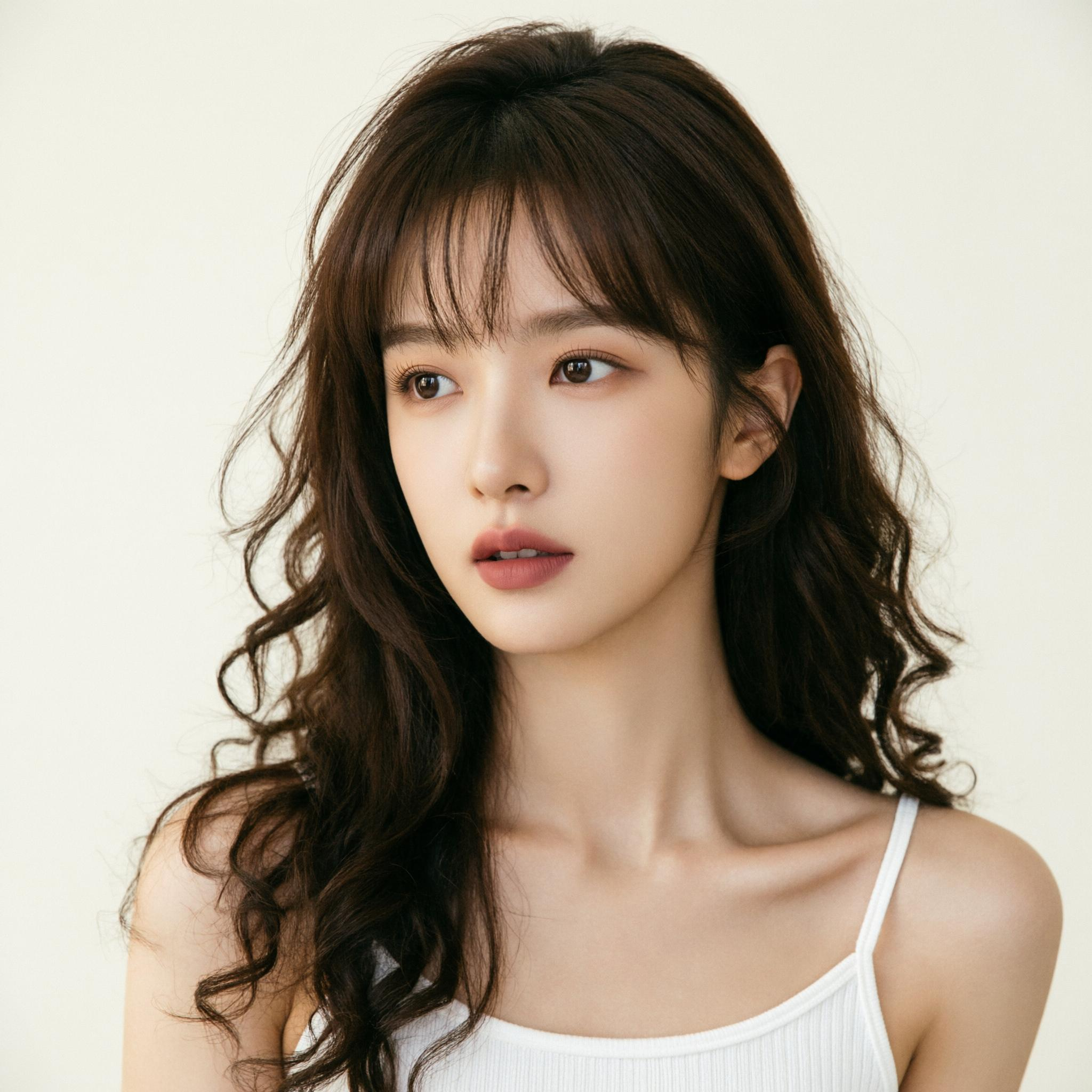
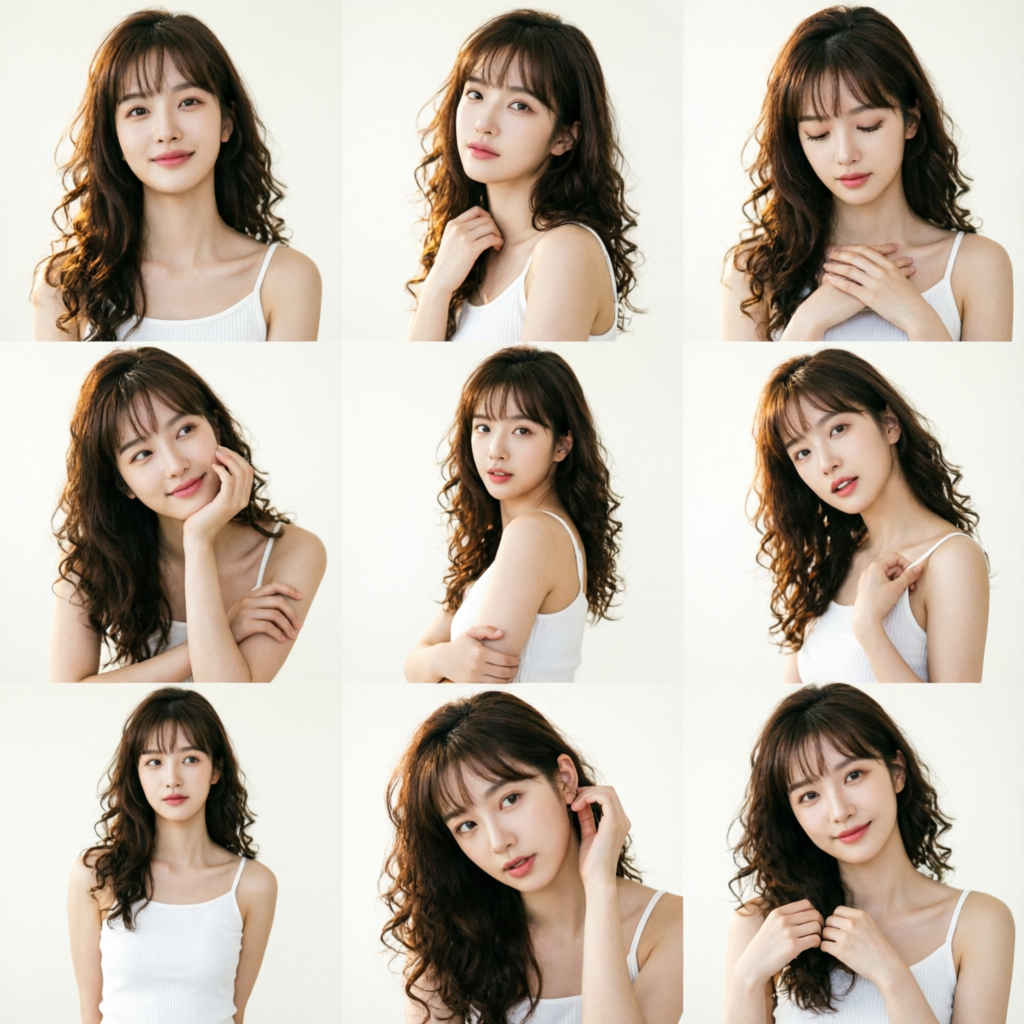
Here is a two-image editing example:
将图1与图2中的同一位东亚男性合成一张自然合照:两人并肩站立于同一场景中,左侧人物(图1)身着米白色长袖衬衫、黑色休闲裤,佩戴黑框眼镜与米色斜挎包(包身印有黑色 “CHENG” 字样),右手轻握一折叠扇,面带温和微笑望向右前方;右侧人物(图2)身着红黑相间学士服(红色前襟饰有金色盘扣与“北航”二字刺绣,黑色披肩边缘缀深蓝花卉纹样,内搭浅灰蓝衬衫),佩戴同款黑框眼镜,双手持深灰色毕业证书,目光正视镜头,神情沉稳。背景统一为图2中的爬满常春藤的青灰色石墙,阳光从左上方45度角洒落,形成柔和丁达尔光束,照亮两人发梢与肩部;地面为浅灰花岗岩铺装,光影过渡自然。两人站姿协调,间距约30厘米,身体微向对方倾斜以体现亲密感,整体构图居中对称, 采用等效全画幅50mm镜头拍摄(f/4.0,1/160s,ISO 200),景深适中,面部清晰锐利,背景藤叶呈柔焦虚化,色调温暖真实,无拼接痕迹。
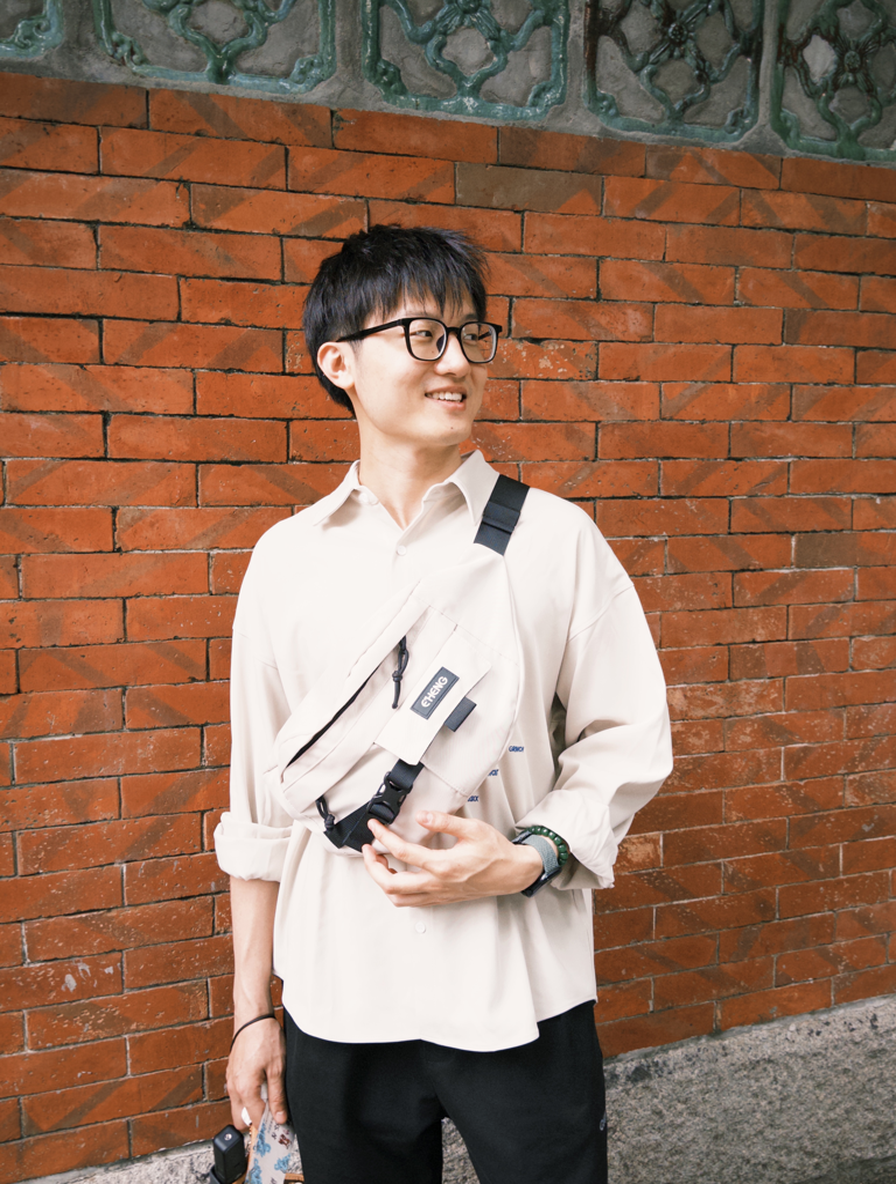
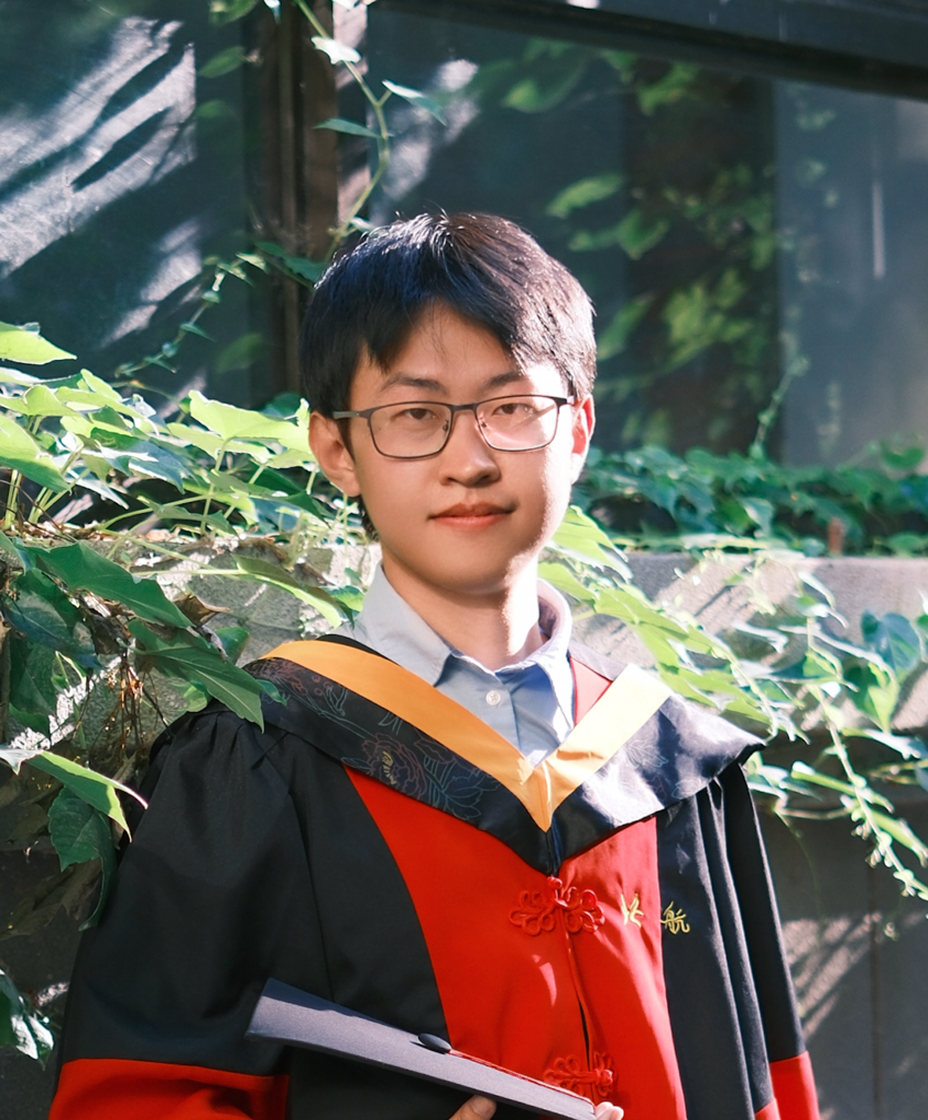
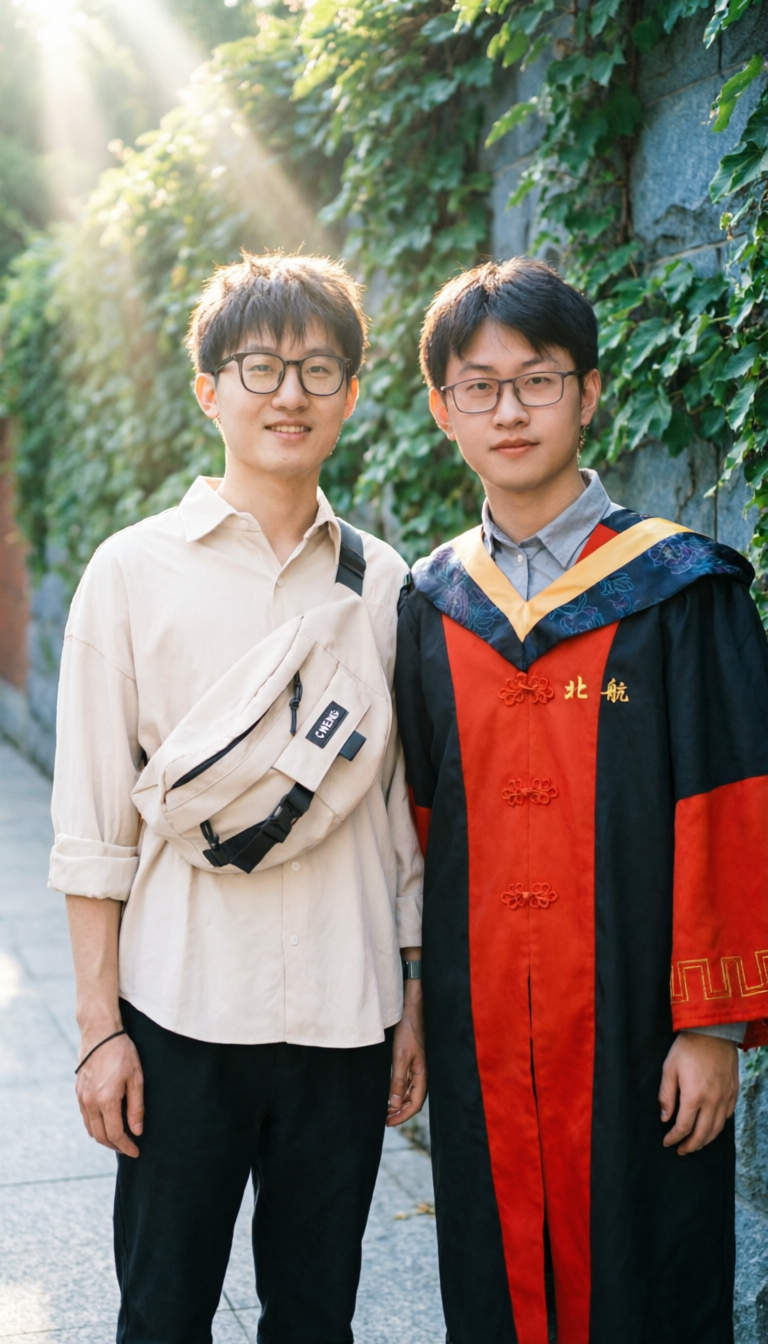
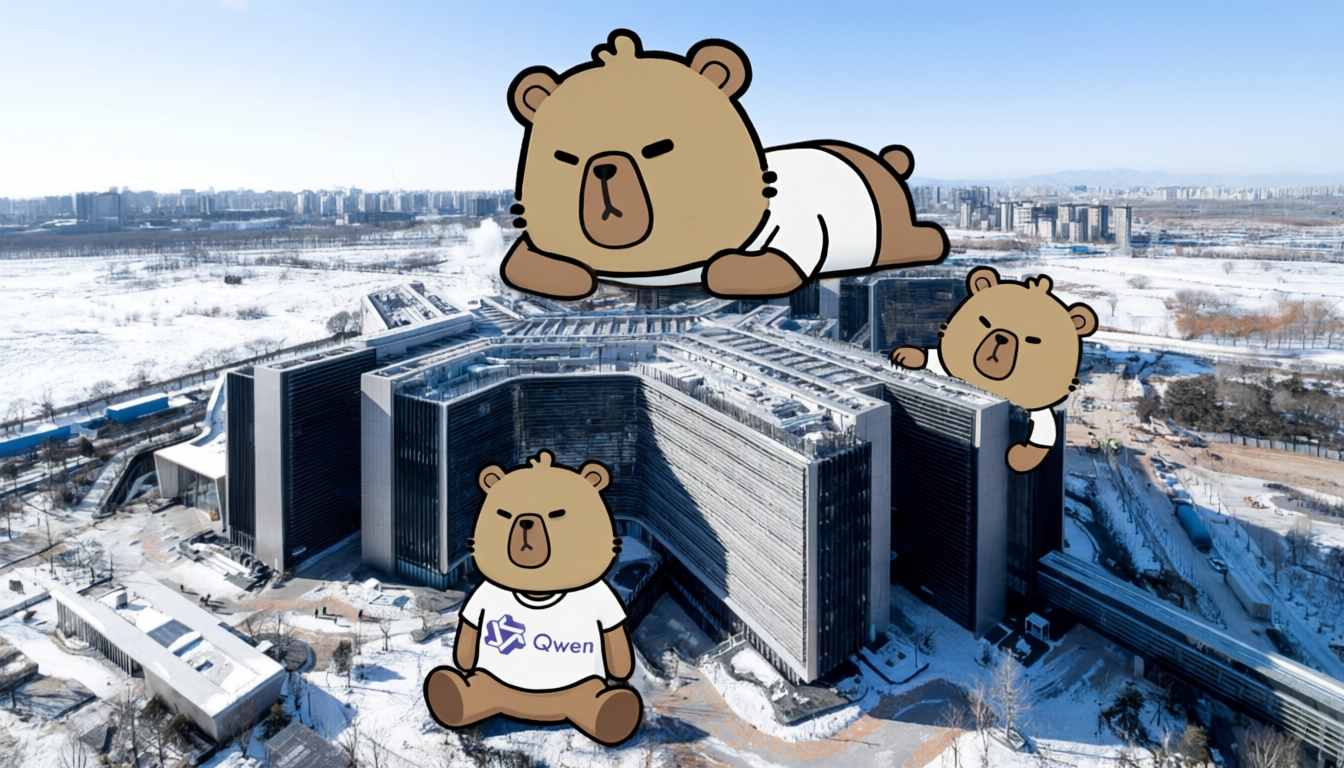
And a cross-dimensional editing example:
使用图一的城市照片作为底图。请勿更改照片中的真实建筑、街道、车辆或人物。保持照片的真实性。三个图二中的卡通形象在建筑物周围,一个趴在建筑物上方,一个从建筑物的右边探出头来,一个坐在建筑物前的空地上。该形象应采用扁平化的图形风格绘制,轮廓清晰,类似于壁画或海报插图。
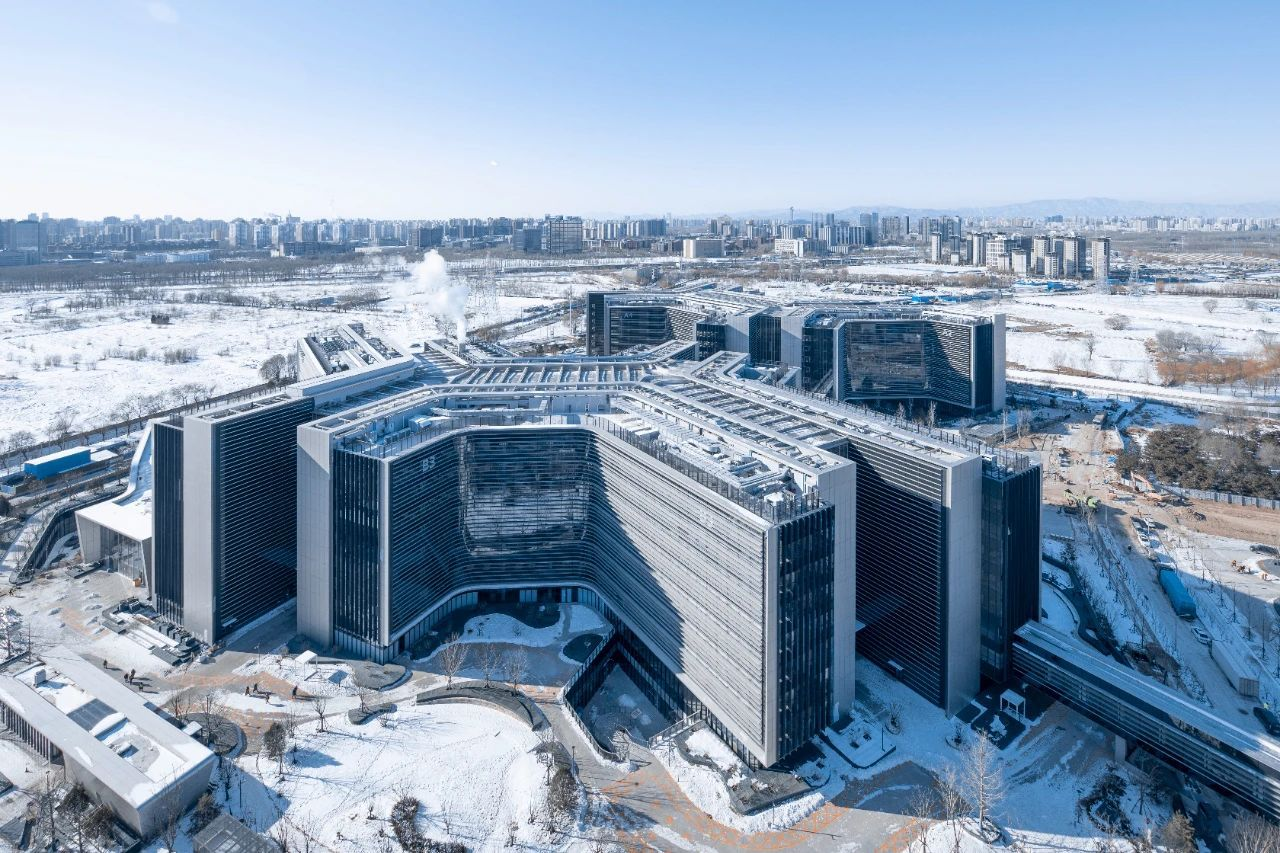

This report is quite lengthy—thank you for reading this far! Finally, we’d like to share the blog’s header image prompt for “Qwen Street” (we’re sure some of you will ask for it):
冬日北京的都市街景,青灰瓦顶、朱红色外墙的两间相邻中式商铺比肩而立,檐下悬挂印有剪纸马的暖光灯笼,在阴天漫射光中投下柔和光晕,映照湿润鹅卵石路面泛起细腻反光。左侧为书法店:靛蓝色老旧的牌匾上以遒劲行书刻着"文字渲染"。店门口的玻璃上挂着一幅字,自上而下,用田英章硬笔,竖排写着“专业幻灯片\n中英文海报\n高级信息图”,右下角落款印章为‘1k token’朱砂印。店内的墙上,可以模糊的辨认有三幅竖排的书法作品,第一幅写着着"阿里巴巴",第二幅写着"千问大模型",第三福写着"图像生成"。一位白发苍苍的老人背对着镜头观赏。右侧为花店,牌匾上以鲜花做成文字"真实质感";店内多层花架陈列红玫瑰、粉洋牡丹和绿植,门上贴了一个圆形花边标识,标识上写着"2k resolution",门口摆放了一个彩色霓虹灯,上面写着"细腻刻画 人物 自然 建筑"。两家店中间堆放了一个雪人,举了一老式小黑板,上面用粉笔字写着"Qwen-Image-2.0 正式发布"。街道左侧,年轻情侣依偎在一起,女孩是瘦脸,身穿米白色羊绒大衣,肉色光腿神器。女孩举着心形透明气球,气球印有白色的字:“生图编辑\n二合一”。里面有一个毛茸茸的卡皮巴拉玩偶。男孩身着剪裁合体的深灰色呢子外套,内搭浅色高领毛衣。街道右侧,一个后背上写着"更小模型,更快速度"骑手疾驰而过。整条街光影交织、动静相宜。
That concludes the main content of this update. Happy creating with Qwen-Image-2.0!