



 A relatively simple LoRA testing workflow that can be used to compare multiple LoRAs (or one LoRA at difference weights) with less clicks. I cleaned it up a bit and added some notes for easier use.
V2 - Added a group for enabling or disabling Lora's. The wires are a bit messy on this version compared to V1
Brief Instructions for using: PLEASE CHANGE YOUR WIRE SETTINGS TO 'STRAIGHT' FOR OPTIMAL WIRE MANAGEMENT.
-First thing you need to do is go to your settings via ⚙️icon
-Next scroll down the list of options (you may have many if you have custom nodes installed) and find the setting called “Link Render Mode”.
-By default this would be set to Spline, but you can change it 'straight' for optimal wire management in this workflow.
Instructions with images:
https://weirdwonderfulai.art/comfyui/tip-workflow-link-noodle-settings/
~~~~~~~~~~~~~~~~~~~~~~~~~~~~~~~~~~~~~~~~~~~~~~~~~~~~~~~~~~~~~~~~
- All Instruction nodes are bright yellow for easy locating.
-To install missing nodes, open the Manager and select "install Missing Custom Nodes"
-To turn off a group, Right click on the group and select "Set Group Nodes To Never" or "Bypass Group nodes"
-To turn on a group, right click on the group and select "Set Group Nodes To Always"
- Although this workflow is relatively straight forward; if you have further questions, please do not hesitate to leave a comment.
For adjusting the amount of LoRA's you want to use on V1, mute and bypass accordingly: 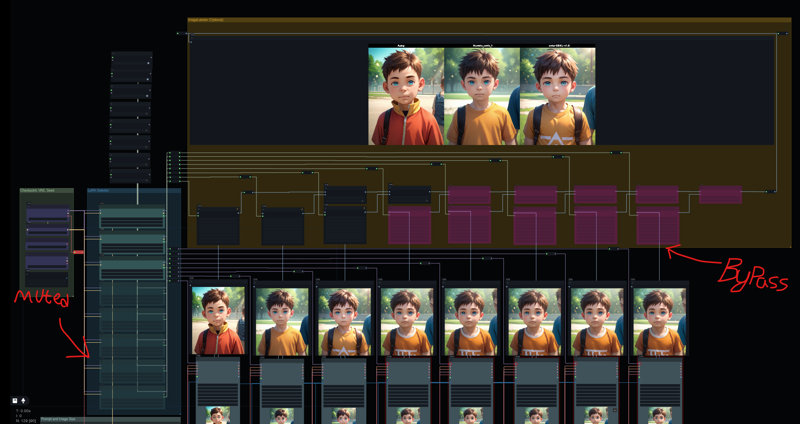
I prefer V1 due to it's cleanliness, but to each their own.