

Hello Civitai users. On the road to developing my first lora, I found a great number of resources to draw upon and eventually made something pretty good. However, I forgot to bookmark any of them and had to look into finding them again when I eventually wanted to make a second one. For simplicity sake, here is my condensed guide so you don't have to weigh the advisements of multiple guides as I did. Feel free to navigate using ctrl+f.
Historical context: This guide was initially made for Pony Diffusion, but was later adapted for others.
If you would like to see my tagging and dataset prep article for some minor tips, see the link here.
Sample image prompts
While technically not in the "advanced settings", I want to preface this by letting you know to never let the generator pick prompts automatically. It's a jumpled mish-mash of whatever tags you used, and you more often get something ugly. Try to prompt for a diverse set of locations and contexts, such as day/night, 1boy/1girl, or anything else you trained it on to test it out early. Don't forget your activator phrase, if you used one, or (for pony diffusion) that score stuff pony makes you put at the beginning of the prompt.
Scores: score_9, score_8_up, score_7_up, score_6_up, score_5_up, score_4_up
Alternatives to normal scores: Look here https://civitai.com/articles/5473 or look in the "Recommendations Prompts" section here https://civitai.com/articles/6044/pony-xl-image-generation-guide-for-my-and-other-models
Steps: "True steps" is a a function of training image count, epochs, and number of repeats (num repeats). "Divided steps" is this divided by training batch size (train batch size)
Divided steps=(training image count x epochs x number of repeats)/training batch size*
Source: https://civitai.com/articles/4/make-your-own-loras-easy-and-free
Note: The distinction between divided and true steps is sourced to a comment here by PotatCat, who says that people often refer to both of these as just "steps", so you need to be carful which one someone is referring to when looking up sources about this.
*: That source says it divides by training batch size, but PotatCat also mentions that it is really divided by steps per iteration, which equals (training batch size x gradient accumulation), where gradient accumulation is a "fake batch size multiplier". However, because gradient accumulation is mentioned nowhere in the on-site trainer as of now, I will keep the formula like this for simplicity. I can imagine this is more relevant in training locally.
Epochs: The lora as it was saved after a round of training. For every epoch, your lora will be save, and re-trained on your images for however many epochs you set it too. It will show you how each epoch generates using your sample prompts for reference. You can choose which ever looks best from the epochs. Keep epochs between 10 and 20. You can go higher if you want I suppose.
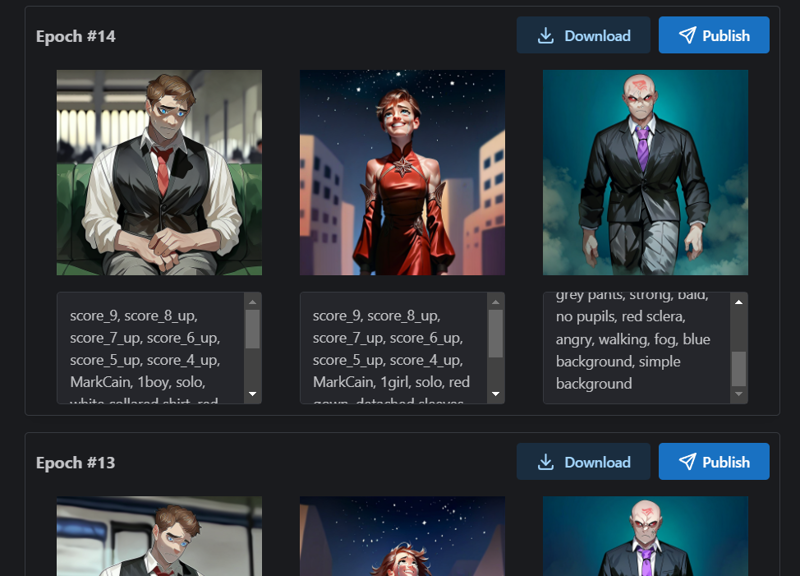
Note: This is an example image from when I was seeing if I could train a lora using 3 sample images. In case you are curious, it did not go so hot.
I see a lot of people use 1000-3000 divided steps in examples, but my first one used 470 and was pretty good, and the step count people use on-site seems to vary from 440 to 4400, so I guess there is some room for choice. Any less than that and the results are not very good. holostrawberry recommends that you make sure that the epoch is high (anywhere from 10 to 20) as opposed to the repeats so that you may be able to get a better view of how your lora is progressing as the steps go on, and pick the epoch at it's best point more accurately. Increasing batch size makes it train faster by increasing the steps per iteration, but making this too high may sacrifice accuracy or the risk of overbaking (since you are still training all the same images, just more in one step). Only really bump up the repeats and batch size if you have the image count/variety to let it get that high without overbaking. A low image count lora especially should aim around 1000 steps with a low batch size and a repeat count just high enough to get you to 1000.
Pony Example: My first model used 470 steps with 47 images, 10 epochs, 5 repeats, and 5 training batch. I thought that the 8th epoch was the best looking, so I used that one. I don't know if this was good though, since the image set was wholly composed of AI generated images, possibly making the training easier.
Illustrious examples: My Sinner character lora had 25 images, and I gave it the settings 20 epochs, 4 repeats, and 2 batch size for a total of 1000 steps. Previous attempts with a batch size of 4 and higher repeats were overbaked. Meanwhile, another character lora I had used 37 images with 20 epoches, 7 repeats, and 3 batch size. and epoch 5 was my epoch of choice. The fact that my chosen epoch was so low tells me I should have decreased the batch size, repeat count, or learning speed (which's ratio was 0.0005/0.0001).
Tip: If you require more than one training run, try to aim your step count and learning rate such that your ideal epoch is near the last epoch for better comparisons between end versions. Eyeball it based on previous attempts.
Personal experience: The consequences of overtraining are more apparent with a small dataset. If you are training on something with very little images, keep your steps on the lower end with a lower batch size.
This source has many examples of step calculation and what might be appropriate settings: https://civitai.com/articles/680/fictional-characters-among-other-things-a-lora-training-guide
Sources: https://civitai.com/articles/4/make-your-own-loras-easy-and-free and https://github.com/bmaltais/kohya_ss/wiki/LoRA-training-parameters
Resolution: Resolution is proportional to detail quality.
Default is 1024. A lot of people say to bring it to 512 or 768, but then you would need to do some stuff to it to increase it's quality, and you can't really do all that in the Civit trainer, so leave it at 1024.
Edit: A comment by PotatCat says that yo should only bring it to 512 for SD1.5 loras.
To understand what to do at 512 resolution off-site, read "Fictional Characters Among Other Things: A LoRA Training Guide".
Sources: https://civitai.com/articles/4/make-your-own-loras-easy-and-free and https://civitai.com/articles/680/fictional-characters-among-other-things-a-lora-training-guide
Enable bucket: Turn it on.
Shuffle tags: It shuffles tags so the lora will understand that prompt order is variable. Turn it on.
Keep tokens: The number of tags at the beginning of the prompt it will keep in place without shuffling.
If you are not using an activation phrase, set to 0.
If you are using an activation phrase, set to 1. Make sure activation phrase is the first in the prompt in sample images. Advised to use 1 or more activation phrases for character loras. Other loras can do activation phrases too if you want.
If you are using multiple tags unique to the lora, keep those at the beginning of the tags and set keep tokens equal to the number of unique tags each images has. Although, using more than one phrase is uncommon, and over-activation tagging is harmful, so only do this if you have a good reason, like if every training image features the character in one of various outfits you want to tag, or if you are doing a style pack. However, for that first example, you could also just use tags to describe different parts of an outfit to give it a little bit more flexibility and avoid the need for multiple tokens.
Source on the harm of over-trigger wording: https://civitai.com/articles/7553/please-creator-use-one-word-for-trigger-words
Source: https://civitai.com/articles/680/fictional-characters-among-other-things-a-lora-training-guide
Clip skip: Always 2 for pony.
Flip Augmentation: No one talks about this, but the description I've seen talk about how it helps with symmetrical lora subjects by adding flipped versions of the training data to the sample. Apparently, it's bad to use this in other situations according to a comment by NanashiAnon. Something as simple as asymmetrical bangs makes this a bad idea.
Learning Rate: Based on my research from when I was looking into how convolutional neural networks work, I think this is a multiplier on how much the error calculated in every training step influences the weights and biases of the lora in subsequent training steps or in the end product, with there being two learning rates for image reproduction and text association respectively.
Unit LR (Unit learning rate): Variable based on model. Decrease if image count is poor. Symptoms of having a too high unit LR include the blurring of custom detail, such as eyes. Blurring would be worse with variation.
Cited method
Pony: ~0.0001 or ~0.0005. Guides vary. Tune based on image count.
Illustrious: ~0.0003. ~0.00006 or ~0.00003 for styles. Tune based on image count.
Personal experience: I once got really good results of an illustrious style lora with good image count ant variety at 0.0005 with a TE-LR of 0.0001. Eyes were blurry though, but still. That's when you should increase the Unit LR.
Method
The site only lets you do 20 epoches before it starts deleting every other one. Set epoches to 20, with the other settings that determine step counts at their default. You can start at the Unit LR recommended above, or just 0.0005 as a general starting point. Then, she how many epochs it takes for there to be a clear long between underbaked (poor detail capture) and overbaked (overcaptured blurry details). For your next attempt, decrease the Unit-LR such that this dividing line is pushed to being slightly before your last epoch (20, or a bit higher if you want). This will let your lora cook for as long as the site will allow it. Then, adjust TE-LR based on the following information.
Text Encoder LR (Text encoder learning rate): 1/5th of the unit LR, variable based on what you want it to do.
If you would like to experiment, sansenskly's article states that a high TE-LR equal to the U-LR causes the model to adopt the style of the dataset, but a lower TE-LR (like 100x lower) causes the lora to rely more on the checkpoint's default knowledge, increasing it's capacity for variety at the cost of style and custom tag capture.
LR Scheduler (Learning rate scheduler): Cosine with restarts is the best one, but you can only use it if using the Adafactor scheduler. If using prodigy, just use cosine.
LR Scheduler Cycles (Learning rate scheduler cycles): Keep at 3. I think this is the number of restarts used in Cosine with restarts.
Sources: https://civitai.com/articles/680/fictional-characters-among-other-things-a-lora-training-guide, https://civitai.com/articles/4/make-your-own-loras-easy-and-free, https://civitai.com/articles/19619/how-to-train-lora-for-beginners-or-guide, and I got the bit about decreasing Unit LR from tips I received off Discord.
Min SNR Gamma: It has something to do with compensating for something in the training process. According to PotatCat's comment, this removes some random nose during training, where lower numbers are stronger.
People say to set this to 5, and PotatCat said that 5-7 is advised, as having too low of a MinSNR can inhibit the training of detail. For my lora, I had it at 0 and it was fine, but also that was actually my first lora so you may not want to just go off of that. Just set it to a number based on how detailed you want it.
Sources: https://github.com/bmaltais/kohya_ss/wiki/LoRA-training-parameters and https://civitai.com/articles/680/fictional-characters-among-other-things-a-lora-training-guide
Edit: article for more info https://civitai.com/articles/6173/demystifying-snr-min-snr-debiased-estimation-and-ip-noise-gamma.
Network Dim (network dimension) and Network Alpha: The dim and alpha are used in a fraction together. Dimension is the degree to which a lora is able to remember details of an image. Alpha makes the learning process slower to force it to learn the more consistent details.
So far, I have only found personal recommendations and habits on how to set this. No one seems to have a rational consensus on how to use this, and just default to whatever they are comfortable with. Below, I show some sources before concluding what to set this too.
If dim and alpha are equal, they will essentially have no effect. However, alpha must never be greater than dim.
One sources stated, a dim of 16 and an alpha of 8 is a good combo for character loras. It's a highly recommended setting to just have the alpha be half of the dim, with 16/8 just being popular in general. More on what to debate setting the dim to down below.
The comment below by PotatCat states that 8/4 is enough for characters and 16-24 for styles and Cat often uses equal dim/alpha for styles.
Apparently, a dim of 32 is sufficient according to reports.
Example of someone using dim/alpha of 8/8: https://civitai.com/articles/6503/how-to-easily-create-ponypdxl-lora-better-than-80percent-on-site-just-for-500buzz
My conclusion: Set the dim to 8, 16, 24, or 32 depending on the complexity of whatever you are training in the lora, where a higher dim is used for something more complex with more details to take note of. You can use numbers between those too, but I have not determined what the sweet spot is there based on what you are making. Most people say the alpha should be half of the dim, but there does seem to be some room for personal preference here like with PotatCat using equal value for styles. I do not know how the end result would compare with this though.
Example: I used a dim of 32 and an alpha of 16 in my first lora. I believe this was the right call, since it was a complex character with a lot of potential outfit changes and details. The alpha of 16 was a part of the "make the alpha half the dim" rule to cut out the bad training.
Noise Offset: Adds noise to the training, which the neural network will have to undo based on prior training and the rest of the image + tags in an attempt to reconstruct the base image. Can be anything from 0 to 1.
No one talks about it, so it was hard to find takes on this. PotatCat in the comments says that for XL models like Pony this should be 0.0357 since that is what it was trained with.
I used 0.03 in mine too and it worked out fine.
1/18/2026 update: I should disclose that an old style lora I trained had bad eyes until I brought noise offset from 0.1 to 0.03. I think keeping the noise lower at 0.03 is plane better for smaller consistent details in the training data. Working on a different unreleased lora, I came to predict that if you are training on a dataset with multiple artists working on a single character or outfit or something, brining noise offset to 0.1 might help train on the subject while making training slower on small artist-unique details such as eyes (which could otherwise blur your outputs).
Optimizer: There are more of these out there, but Civit only supports adafactor, 8bitadam, and prodigy.
If image count is high: Set to adafactor to use cosine with restarts.
If image count is low: Set to 8bitadam, and use cosine without restarts.
Source: Questions people asked on the Civitai Discord.
Old debate I found. Will keep this here for reference: https://www.reddit.com/r/StableDiffusion/comments/17mk1hs/8bit_adam_vs_adafactor_vs_prodigy_which_optimizer/
Write back if anyone made a lora using this guide. I'd love to hear it.