Download
1 variant available



Side by Side 3D Stereoscope node for ComfyUI by SamSeen 👀
(You can also use cross-eye method to view them.) 😜

https://github.com/MrSamSeen/ComfyUI_SSStereoscope
Updated URL: https://github.com/SamSeenX/ComfyUI_SSStereoscope
Welcome to the SideBySide Node repository for ComfyUI! This custom node allows you to create side-by-side (SBS) stereoscopic images from a standard image and a depth map, enabling a rich, three-dimensional viewing experience.
Introduction
The SideBySide Node is a powerful tool designed for ComfyUI to generate stereoscopic images. It takes a base image and a corresponding depth map as inputs and produces a combined image that simulates a 3D effect when viewed with appropriate equipment.
Installation
To install the SideBySide Node, clone this repository and add it to the custom_nodes folder in your ComfyUI nodes directory:
git clone https://github.com/SamSeenX/ComfyUI_SSStereoscope.git
pip install -r requirements.txt
Example workflow 1
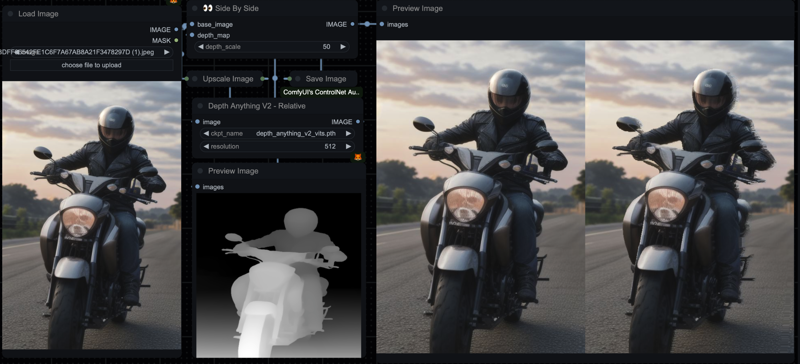
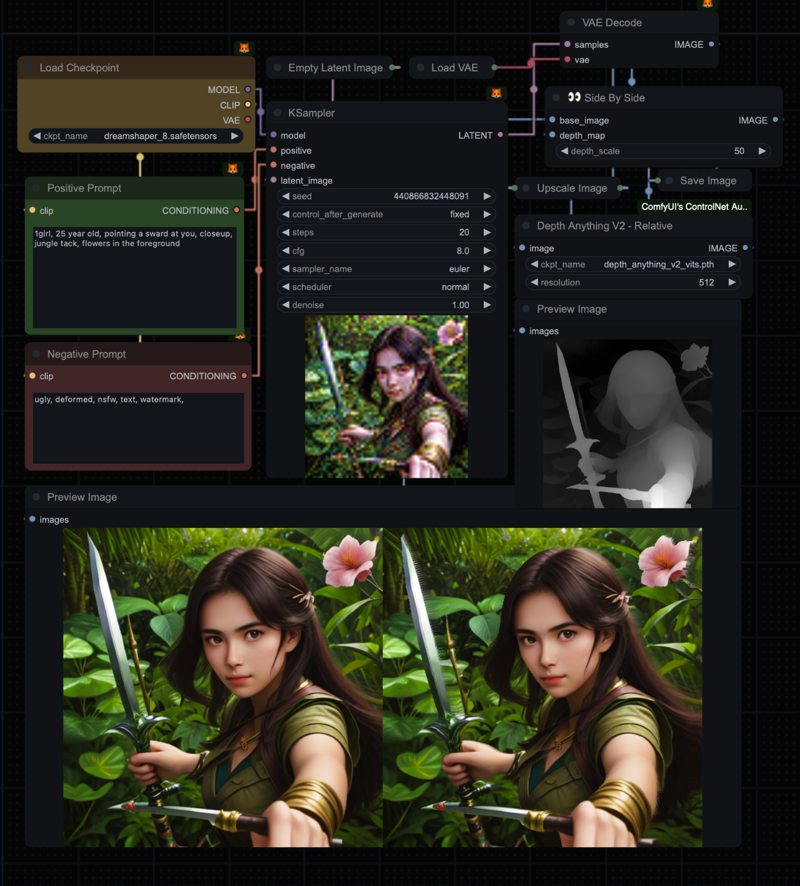
Example workflow 2
UPDATES:
👀 SBS V2: The main node. Input a 2D image, get a 3D SBS image + depth map.
depth_scale: Intensity of the 3D effect.mode: Cross-eyed vs Parallel.highsodium_optimization: Enable vectorized algorithm for faster processing (may produce slightly different results).
👀 SBS V2.1 (External Depth): New in v2.1! Uses the fast V2 engine (HighSodium) but accepts your custom Depth Maps.
Fixes "reducing" artifacts found in the legacy node.
Resolution-Relative Scaling:
depth_scale(0-100) now maps to 0-20% of image width. This gives you fine-grained control while preventing output-breaking values.Scale 10 = 2% width separation.
Scale 50 = 10% width separation.
Scale 100 = 20% width separation (Max).