.jpeg)

.jpeg)
Quickly copy and paste prompt scheduling syntax using this tool!
Prompt Transformation/Blending
This is a form of prompt-scheduling where the desired effect is to blend two prompts together. This is achieved by generating the first prompt for part of the composition before stopping and generating a second prompt in its place.
I’ve encountered two articles (Article 1, Article 2) on Civitai describing one format for prompt transformation. Both discuss using the following format: “[prompt1: prompt2: 0.X]” (where X indicates a percentage from 1-99). In this approach, the model will generate ‘prompt1’ for ‘X’ percent of steps before stopping and switching to ‘prompt2’ for the remainder of the composition.
Later, I found a third article (Article 3) that describes an alternative format: “[prompt1: prompt2: X]” (where X indicates a specific number of steps). In this case, the model generates ‘prompt1’ for ‘X’ number of steps before switching to ‘prompt2’ for the rest of the composition. Interestingly, this article also states that the previous percentage-based format (“[prompt1: prompt2: 0.X]”) works as well.
Additionally, Article 2 introduces another format for blending prompts: “[prompt1 | prompt2: 0.X]”. According to the article, this behaves similarly to the percentage-based format, “[prompt1: prompt2: 0.X]”.
Given that there are multiple approaches, the question arises: which one's the correct one? To explore this, we can analyze the results using X/Y/Z plots.
Methodology
Before we get into it, let me briefly discuss what I did so you can recreate this experiment yourself!
UI and Generation Settings
UI Used: WebUI reForge (Any UI with X/Y/Z plot functionality will work too)
Checkpoints Used:
Illustrious-XL - (Trained Checkpoint acting as a baseline)
NTR MIX (XIII) – (Stylised Checkpoint Merge)
Finesse V3 – (Neutral Style Checkpoint Merge)
Base Prompts:
Positive:
masterpiece,best quality,amazing quality, landscape, [BASE VARIABLE PROMPT], lake, valley, dark lighting, night, stars,
Negative:
bad quality,worst quality,worst detail,sketch,censor, nsfw (more on this later),Resolution: 1024x1024
Sampler: Euler a
Scheduler: Simple
CFG Scale: 5
Sampling Steps: 20
X/Y/Z Plot Settings
X Type: Prompt S/R
X Values: Indicated below each image
Y Type: Checkpoint name
Y Values: illustriousXL_v01.safetensors, ntrMIXIllustriousXL_xiii.safetensors, waiNSFWIllustrious_v80.safetensors
Z Type: Seed
Z value: 0,1,2 (Note for the sake of reading experience, I’ll only display the seed '0', I'll attach the full plot with 3 seeds as an attachment in this article)
Now that we’ve done the setup, let’s get to testing!
Results
Prompt Transformation using Steps - [prompt1: prompt2: X]
Base variable prompt: [volcano: mountain: 1]
Full prompt:
masterpiece,best quality,amazing quality, landscape, [volcano: mountain: 1], lake, valley, dark lighting, night, stars,Prompt S/R Value:
[volcano: mountain: 1], [volcano: mountain: 2], [volcano: mountain: 3], [volcano: mountain: 4], [volcano: mountain: 5], [volcano: mountain: 10], [volcano: mountain: 15], [volcano: mountain: 19]
As you can see, the effect of prompt transformation can create very interesting compositions. When ‘X’ is lower, the image retains more traits of the ‘mountain’ prompt. It’s fascinating to observe that even when ‘X’ was ‘1’—meaning that the ‘volcano’ prompt was applied for just one step—it was sufficient to give the mountain in NTR-MIX’s and Finesse’s outputs an orange summit, akin to a sunset hitting the summit. As ‘X’ increases, more and more ‘volcano’ traits emerge, until at ‘X’ being 19, the composition essentially becomes a full volcano.
That’s pretty definitive; this must be the right format for prompt transformation, right? Well, let’s try the next format just to be sure.
Prompt Transformation using Ratio/Percentage - [prompt1: prompt2: 0.X]
Base variable prompt: [volcano: mountain: 0.05]
Full prompt:
masterpiece,best quality,amazing quality, landscape, [volcano: mountain: 0.05], lake, valley, dark lighting, night, stars,Prompt S/R Value:
[volcano: mountain: 0.05], [volcano: mountain: 0.1], [volcano: mountain: 0.15], [volcano: mountain: 0.2], [volcano: mountain: 0.25],[volcano: mountain: 0.5], [volcano: mountain: 0.75], [volcano: mountain: 0.95]
Wait! I know what you’re thinking; did I just copy and paste the image again? Maybe No! What I did was take each step to represent 1/20 or 5%, and convert the ‘X’ step values from the previous format into their equivalent ratio—e.g., “[volcano: mountain: 5]” becomes “[volcano: mountain: 0.25]”. This demonstrates that either approach is perfectly valid and will be interpreted by the model as the same instruction.
So that just leaves one final prompt format to investigate.
Prompt Transformation using Ratio/Percentage, and Pipe ( | ) separator - [prompt1 | prompt2: 0.X]
Base variable prompt: [volcano | mountain: 0.05]
Full prompt:
masterpiece,best quality,amazing quality, landscape, [volcano | mountain: 0.05], lake, valley, dark lighting, night, stars,Prompt S/R Value:
[volcano | mountain: 0.05], [volcano | mountain: 0.1], [volcano | mountain: 0.15], [volcano | mountain: 0.2], [volcano | mountain: 0.25],[volcano | mountain: 0.5], [volcano | mountain: 0.75], [volcano | mountain: 0.95]
So what happened here? I’m not certain either. I know the model is interpreting something from the prompt, as there are slight variations between each image, but otherwise, there is no coherent pattern of change as you move up and down the ratio. I’ve tested a few other potential formats (“[prompt1|prompt2: X],” and “[prompt1 | prompt2: 0.X]”), and while “[prompt1 | prompt2: 0.X]” produced slightly different results from “[prompt1 | prompt2: X],” I still couldn’t find a coherent pattern of change. Perhaps some of you more seasoned voyagers may be able to shed light on this?
Alright, so we can confirm that two syntax formats: “[prompt1: prompt2: X]” and “[prompt1: prompt2: 0.X]” are recognized by the model as an instruction for ‘prompt transformation,’ and that, as long as ‘X’ and ‘0.X’ are equivalent to each other in terms of steps, they will generate the same image. Are we done?
Not quite.
Prompt Transformation using Ratio/Percentage, and “BREAK” separator - [prompt1 BREAK prompt2: 0.X]
Base variable prompt: [volcano BREAK mountain: 0.05]
Full prompt:
masterpiece,best quality,amazing quality, landscape, [volcano BREAK mountain: 0.05], lake, valley, dark lighting, night, stars,Prompt S/R Value:
[volcano BREAK mountain: 0.05], [volcano BREAK mountain: 0.1], [volcano BREAK mountain: 0.15], [volcano BREAK mountain: 0.2], [volcano BREAK mountain: 0.25],[volcano BREAK mountain: 0.5], [volcano BREAK mountain: 0.75], [volcano BREAK mountain: 0.95]Let me give a bit of context for this one before I show the results. What I noticed, when I was working with “[prompt1 | prompt2: 0.X],” was that the pipe (|) acts as a separator for both prompts, and that checked out for the first two formats as well, where the colon (:) is used as a separator. I had a thought to try other forms of separators. “BREAK” was the first I’ve tried, and here is what it output:
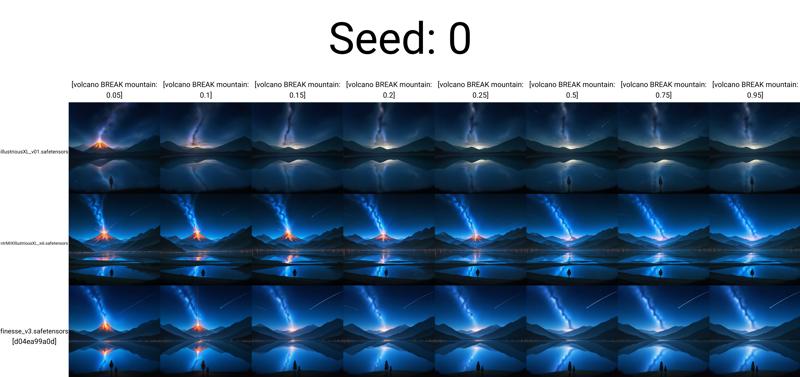
Okay, it looks like the first two X/Y/Z plots but in reversed order. But wait—it looks like the mountain and volcano disappear altogether in the last image...
Conclusion
This experiment confirmed that both [prompt1: prompt2: X] and [prompt1: prompt2: 0.X] are valid for prompt transformation, producing consistent results when equivalent step values are used. Although using pipe (|) as a separator for prompt scheduling was inconclusive, it did widen our perception to investigate other separators, and "BREAK", revealed intriguing behaviors, such as reducing prompt weights without traditional (prompt:0.X) syntax.
Now what?
It seems that we’ve found a way to reduce a prompt’s weight without relying on (prompt:0.X) syntax. This needs further investigation, which luckily I’ve done! Unluckily, I’m currently running on fumes after collecting data, so an upcoming article on this method of prompt weight reduction will follow soon! (I’ll link to it here when it comes out.)
How can I type out prompt syntax quickly?
You don't need to! Check out my 'Voyager's Quick Copy Toolbox', it's an offline tool that allows you to quickly copy prompt syntax to your clipboard for easy pasting. Less typing, more generating! (^‿^)👍
This is my first time conducting such an experiment and writing it in an organized manner, so mistakes may abound! Please let me know if you have any suggestions, changes, or ideas to further explore!
Also, have a look at the attached image plots if you want to see the full X/Y/Z plot with 2 more seeds!
May this knowledge help you on your journey, fellow voyager, making your explorations a little bit easier. I'll return soon to share more of what I've encountered from my voyages.

Acknowledgements
• I'd like to sincerely thank both:
and
I’m incredibly grateful for the they've patience shown in answering my questions about prompt syntax, as well as for the outstanding articles that have taught me so much on the subject. If you’re looking to dive deeper into prompt syntax and scheduling, I highly recommend exploring their thorough and insightful articles!
• I also want to thank my followers! I ended up reaching 1.1k followers somehow!
• Finally, I want to thank you, fellow voyager, and intrepid reader for reading this far! (^◡^)/